Please note that the following review is a major rewrite of the original article where I ended up recommending this soundcard. I cannot do so anymore - to find out why you have to read it again. There´s an alternative for the X-Fi HD USB: the FiiO E07K 'Andes'. It doesn´t feature an RIAA amp and cannot record - but it´s equipped with true 44.1 kHz playback and it sounds just perfect with headphones from 16-150 Ohm.
Since originally posting this article on January 6, 2012 exactly one year has passed and in the meantime I haven´t been inactive when it comes to research concerning the
X-Fi HD USB / Digital Music Premium HD. Why would I alter an already written article siginificantly? You know, bloggers consider this to be bad form because it´s not exactly an example of transparency. Secondly it´s unfair to people who might´ve bought this card because of myself recommending it. Point is, during the year that has passed I´ve accumulated some additional information and experience I cannot ignore which will lead me to alter my conclusion considerably. My original conclusion was like this:
"...especially for this price - this is a well designed and very good sounding interface with a lot of available connections and features (...) Recording quality is good, playback quality even better, the headphone output is strong enough for most available headphones with impedances from 16-150 Ohms on every system, build quality is well done, design is nice... I cannot wish to have more for the money. Guys, this thing is ridiculously cheap considering its price, it´s a true bargain. I never liked my X-Fi eXtreme Music... but oh, I love this one!" In the end of this now rewritten review you will bear witness to a changed opinion of mine. Yes, I´m ashamed to admit that I seem to have been wrong about many things with this card - I could have gone the easy route and kept my mouth shut. Instead I wanted to be as honest with you as I can be, I would not be able to forgive myself for keeping the truth from you. BTW, this occasion also provided the opportunity to make new and hopefully improved photos. YAY!!
 |
| Creative Labs Soundblaster X-Fi HD USB / Digital Music Premium HD |
I acquired this little inexpensive gadget only because I´d found out with my then new
Sennheiser HD-448 that the headphone output of my
Lenovo SL-510 sucks. While this wasn´t obvious with my
Superlux it became irritating soon with the very balanced Sennheiser because of missing treble and flat stageing. In the end I decided to buy another soundcard which turned out to be the X-Fi HD USB. True, I could have used my
E-MU 0202 USB instead but its headphone output has a high output impedance (22 Ohms) and is pretty weak. Since the new Soundblaster was intended to be used soleley at our second appartement with one of my headphones it was of vital importance for it to contain a strong enough headphone output with low output impedance. For amplifying headphones the card uses the
4556 op-amp by
JRC, this amp has been on the market for almost 30 years and it´s still a decent thing considering its price because it has a low output impedance (of just 1 Ohm) in combination with low distortions... that is if it´s treated right. For communication via USB the external card uses the
CA0189 from Creative, the high quality D/A-converter is an
AK4396VF from Asahi-Kasei while the
CS5351 from Cirrus-Logic is responsible for A/D-conversion. But this card has something that distinguishes it from many other USB interfaces:
it contains an RIAA amp, enabling you to connect your turntable to this interface directly without the need of an additional pre-amp. I thought that this particular feature might come in handy should I have the desire to capture vinyl. As it turned out during the last year I have not captured one single LP yet (except for testing); it probably has something to do with my
strong dislike for this obnoxious and dreaded medium. Well, it doesn´t matter since this feature will not disappear suddenly, won´t it? To my own surprise I have instead used another aspect of this card quite extensively: its digital optical output made it possible to record music onto MiniDisc in
high quality.
 |
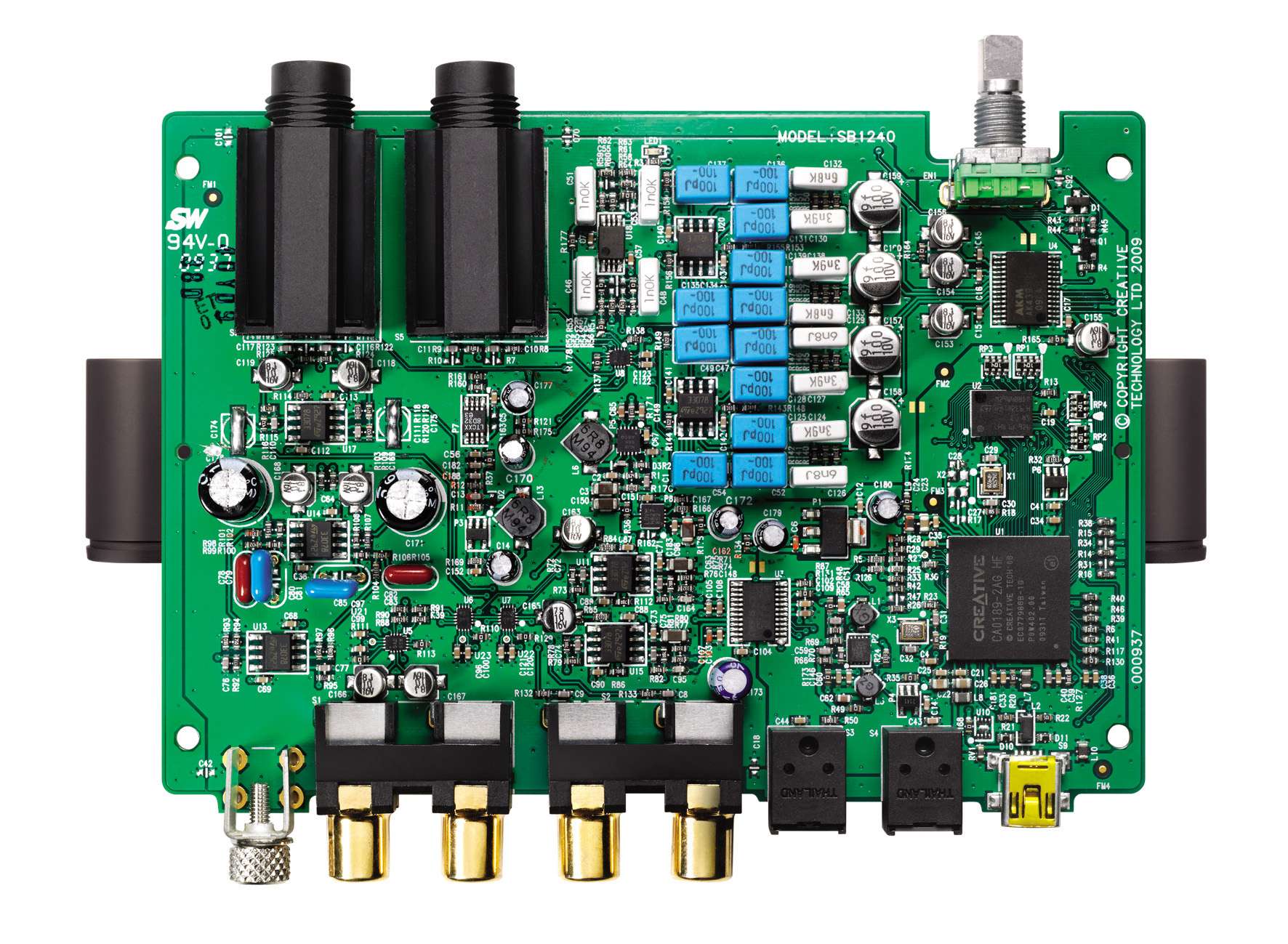
The inside of the Sound Blaster X-Fi HD USB. Not "audiophile" but high quality.
Copyright by Creative Labs.
|
I assume that you might have some reservations towards Creative cards; I´m aware that many people experienced problems with them - I myself never did though, every Creative card I´ve owned has been behaving as it should. Manufacturing quality and finish are decent considering the used materials (plastic). It posesses gold-plated connectors (it´s pointless for audio quality; it only avoids corrosion) and its outer shell feels nice to the touch. I especially love how smooth the volume button turns. But it´s very light and that could create problems: imagine plugging in a headphone - the card will simply slip if you don´t hold it in your hand. Setting up the card was easy, installing and upgrading didn´t produce any errors no matter where and on which PC I did it. BTW, I chose not to install the bloated software suite Creative offers, I picked the driver and the audio panel only. Fans of the DSPs typical for Creative (
EAX 4.0, THX Studio Pro Crystalizer, Surround etc.) will be happy 'cause the card is equipped with them. Nonetheless they should be aware that all DSP functions are done in software and not in hardware like on the internal X-Fi cards which creates additional computing stress for an older PC or one of those low-power PCs. If you´re willing to experiment a bit, if you want to avoid installing issues or if you´d like to have the newest drivers (Creative is a bit lazy there) I can recommend a fully updated package conceived by the famous
Daniel K.;
get it here. The DSPs also provide an indication who the target audience for this card is: your average Joe with an interest in good sound quality for every day tasks or gaming, a lot of features and some toys to play around with. Music Professionals? This card lacks routing options,
ASIO inputs for multitrack recording or XLR ports so it isn´t suited for professional music production. On the whole it feels like a small gadget able to be connected to your stereo system - that´s actually OK, Creative doesn´t hide this. Several people all around the web have reported that this card can be used as a DAC - I haven´t used it that way yet. Furthermore it still needs a running PC (in order to be powered). Well, it´s nice to have that feature.
 |
| Creative Labs Soundblaster X-Fi HD USB front |
So far I´ve talked about its relative advantages and the features it offers. What about shortcomings, are there any? Indeed there are! Creative claims that this card offers an audiophile headphone amp. To determine if the
JRC 4556 really is of audiophile quality we first have to make clear what the expression '
audiophile' actually means. If it means using anything out of the ordinary then this card isn´t audiophile because it uses readily available, not too costly parts. But as I´ve shown this isn´t an issue because something
extremely well sounding can be produced using cheap and simple parts only. Should
'audiophile' mean engineering prowess, then the answer would be Yes/No. Recording and especially playback quality is very decent - but only if you use the line-in / line-out. The headphone output on the other hand seems to be a good example of botched engineering: Creative managed to turn a decent part with perfectly low output impedance into something with an output impedance too high for many headphones the card is actually suited for considering available voltage levels provided by the USB connection. The PCI-Express counterpart for this card, the
Titanium HD, uses the same
JRC 4556 IC and on that card it has a
reported output impedance of
36 Ohms - way too much for IEMs, my
HD-448 or my
Superlux. I have to make it clear that this isn´t the fault of the IC itself; Creative seems to have added parts to save on engineering and it shows. To find out why that could create problems look at an example from an ancient portable player below:
 |
| Sony MZ-R 55 - headphone out with Triple.Fi 10 (copyright not with me) |
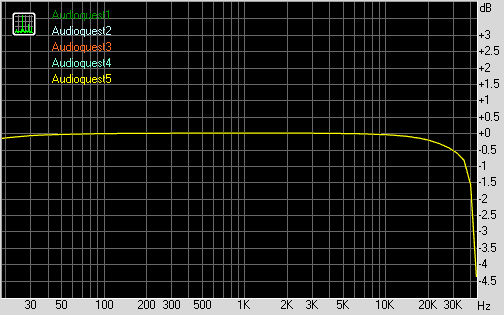
The frequency reading of this exemplary unit above should ideally be a straight line - instead the high impedance of the
MZ-R 55 headphone output creates severe frequency deviations with IEMs which
WILL be audible. Since the PCB circuitry for the headphone amplifier looks similar on both Creative cards (according to others) we can safely assume that both will behave in a similar way, meaning that the X-Fi HD USB would have an equally high headphone output impedance creating the same or even stronger deviations like the ones pictured above. Yes, you´d have to say
"Bye bye" to balanced sound quality. So in essence with the X-Fi HD USB you´ll have lovely audio quality using its line-out - but the headphone output will produce sonic crap should you be using it with low impedance cans susceptible to high impedance outputs. As a basic rule the headphone impedance should be 8 times higher than the output impedance of the amplifier the headphone is connected to. For the X-Fi HD USB you therefore would need a headphone with an impedance of at least
288 Ohms in order to reach balanced sound. Enter my
Sennheiser HD-600 which boasts
300 Ohms... but wait, why is this gorgeous headphone so soft in volume? Because the X-Fi HD USB doesn´t offer enough power for such a demanding and power hungry creature (even though Creative advertises it that way). Which means that for the Creative Labs Soundblaster X-Fi HD USB you´d need a seperate headphone amp to unleash its full potential. Kind of defeats the purpose, don´t you think?
 |
| X-Fi HD USB headphone output and microphone input |
The disadvantages don´t stop with the dreaded headphone out. Are you planning to play
44.1 / 88.2 kHz material with this card
NOT using any resampling? Forget it then. The analogue in-/outputs only offer
48 / 96 kHz sampling rates. This card lacks a seperate crystal needed for 44.1 kHz-based samplerates even though the
CA0189 used for USB communication is actually able to handle one of them (44.1). Which creates the second problem: the optical S/PDIF connectors can only process
44.1, 48 & 96 kHz - but they ignore
88.2. Why does all of this pose a problem? Because the good old CD uses a samplerate of 44.1 kHz, a standard the X-Fi HD USB cannot handle with its analogue outputs and inputs. Therefore a CD will
always be resampled to
48 kHz or to
96 kHz (depending on what is configured in the Windows WASAPI control panel). Using 88.2 kHz files from for example
HDTracks.com with the digital output of this Creative is not possible, at least not without resampling. Digital recording of 88.2 kHz material with its digital input? Don´t even think about it, the card won´t recognize it (I´ve tried). This 'fine' example of engineering seems to have been constructed 15 years ago when those samplerates indeed weren´t very common on PCs. Is this audiophile? I think you can now answer this question yourself.
 |
| Backside of the X-Fi HD USB |
But now to measurments with
RMAA. The first measurment I did for the original review was the commonly employed
loopback from the output to the input of the
same card via an RCA cable. Many computer magazines do this kind of measurment although it´s unsuitable for finding out if a soundcard behaves well. Using a
loopback you for instance don´t know if it´s the output that´s noisy or the input because noise or distortions exhibited by the output are masking the possibly noise- or distortionfree input or vice versa. Therefore I´ve removed it for this updated article. Much more precise than the
loopback are seperate testruns done seperately for the line-in and the line-out. So
I connected the output of the Soundblaster to the input of the
ASUS Xonar Essence ST and the other way round, both times using the same RCA cable. While a PC is inadequate for measuring a soundcard because of grounding issues I knew for certain that my ASUS behaves exceptionally well on it´s in/outputs (noise level of
-115 dB for the output and
-114 dB for the input, no distortions or jitter). To make it short I was fairly positive that it would be good enough for the purpose of exposing possible flaws of the X-Fi HD USB.
 |
Recording (line in, 50 %): from ASUS to Soundblaster X-Fi HD, one year later,
using two different PCs, one on batteries |
 |
Playback (line out, 0 dB fs): from Soundblaster X-Fi HD to ASUS, one year later,
using two different PCs, one on batteries - spectacular results |
My latest
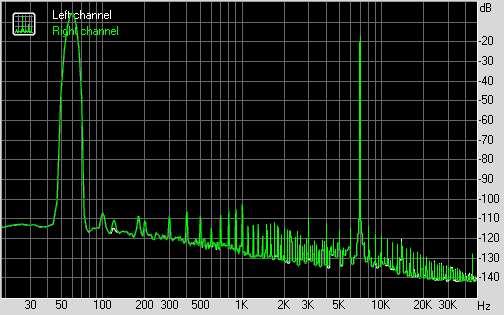
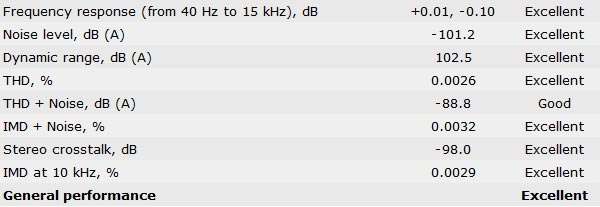
article about USB cables made it clear that the playback part of this soundcard is perfectly engineered. During the tests for that article it transpired that I indeed had been measuring the effect of a ground loop a year ago. The result was that the old measurments did not show the possible performance of the Creative so I replaced them with the ones I did for the third article about USB cables. To the measurments: the DAC
AK4396V is rated at having a noisefloor of
-114 dB (min.) - Creative manages the feet of achieving fantastic
-113 dB. Every measurment was done in
24/96 using
0 dB fs for both cards - except on the input of the Sound Blaster: its volume slider produced a perfect 0 dB fs input signal only at
50 % of the available recording level. Setting a recording level of
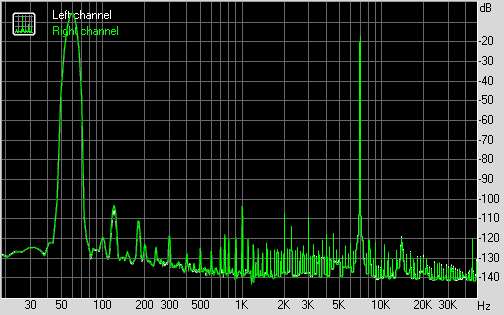
100 % I experienced severe distortions from an overloading input. That behaviour is caused by the line-in also used as an input for vinyl - the amplifier inside this card is always active. With vinyl records there also is a very noticeable gain of frequencies from 7.000 to 12.000 kHz, beyond those frequencies the band decreases sharply. This indicates capacity problems of the input when receiving vinyl signals but it isn´t a serious issue since 85% of commonly available RIAA amps behave exactly like that. Another thing: either the same line-in/vinyl amplifier of this card is used for the microphone input on the front - or a (possible) seperate microphone amplifier produces noise leaking into the line-in. The latter would demonstrate engineering errors:
 |
| Noise, line-in |
The left channel is noisier on lower frequencies than the right channel; I assume the left stereo channel of the line-in probably doubles as the monaural microphone input. This is complaining on a high level because this noisefloor is OK for such a low-priced soundinterface.
However, a few months ago I´ve stumbled upon an additional row of measurments on another site which revealed strong distortions. Since the loopback method was used I can´t tell if the input or the output distorts, I can only say that I myself haven´t witnessed distortions using the same method. EDIT 05.08.13: Hmm, that blog is now gone. My seperate testruns for recording and playback revealed that they are indeed higher for the input than for the output but non-threatening at all. My unit is practically distortion free though two different units of the same card measuring differently using a
loopback might suggest poor quality control on Creatives' side, changed specs or measurments done wrong (happened to me too). Another typical flaw of cheap USB soundcards are high levels of jitter. Not with this card as you can see on the two pictures below:
 |
| Jitter, line-in, 24/96 |
 |
| Jitter, line-out, 24/96 |
The performance is excellent, playback as well as recording are virtually free of jitter. Because I was using a samplerate of
96 kHz for the
Creative and
192 kHz for the
ASUS I have effectively measured the jitter performance for both cards combined - even more impressive, isn´t it? It wasn´t that surprising since this soundcard employs the asynchronous USB transfer: instead of the PC pushing the data towards it the interface itself demands the data only when needed, it therefore is in complete control of the connection and its data transfer. On earlier USB interfaces the theoretically inferior synchronous or adaptive modes were used, occasionally prompting high jitter levels. I should however mention that asynchronous USB doesn´t automatically guarantees perfect audio, the engineers still need to be skilled to avoid jitter. Are you curious to find out for yourself which USB mode your own USB soundcard uses? In that case I can recommend
the USB Decriptor Dumper from Thesycon.
 |
| X-Fi HD from above |
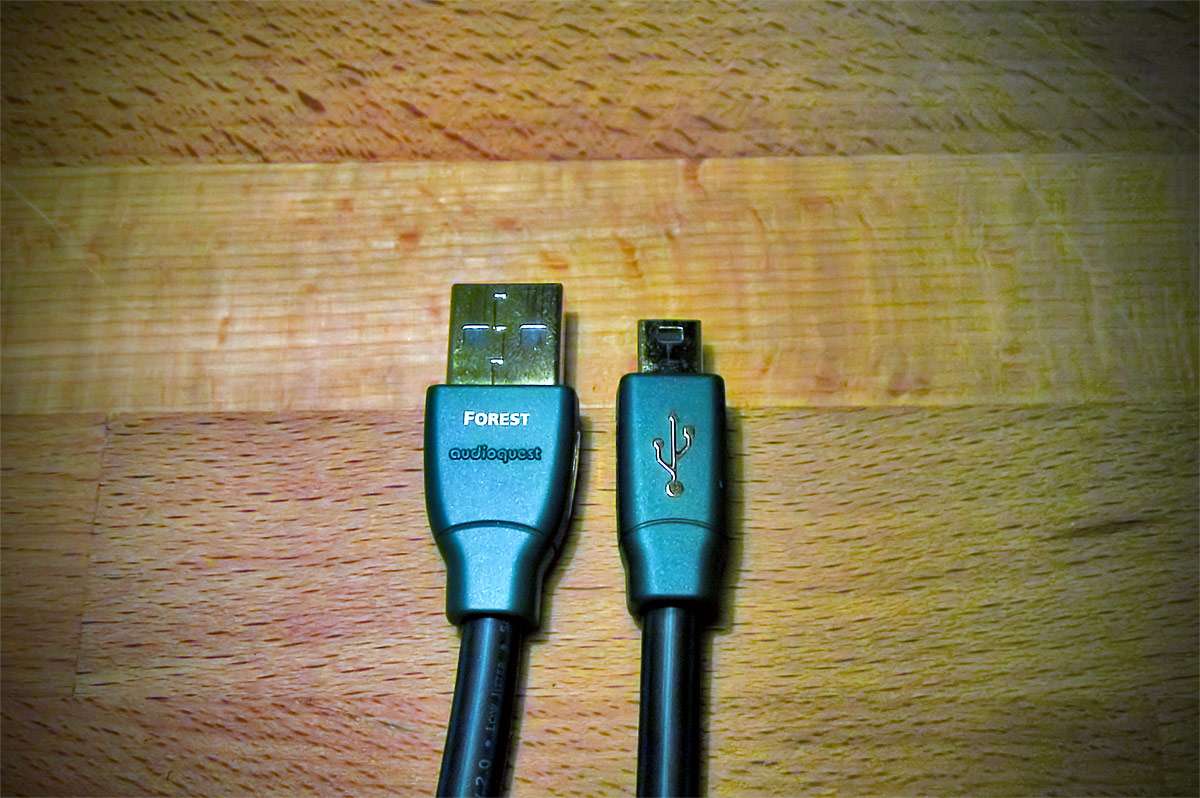
Before I´ll tell you about audio quality I have to mention that I´ve used the X-Fi HD only in combination with the
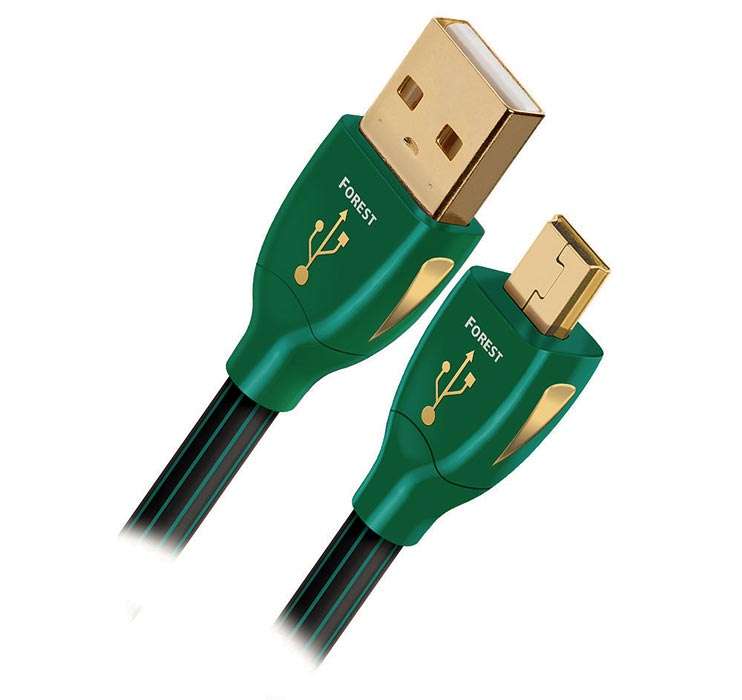
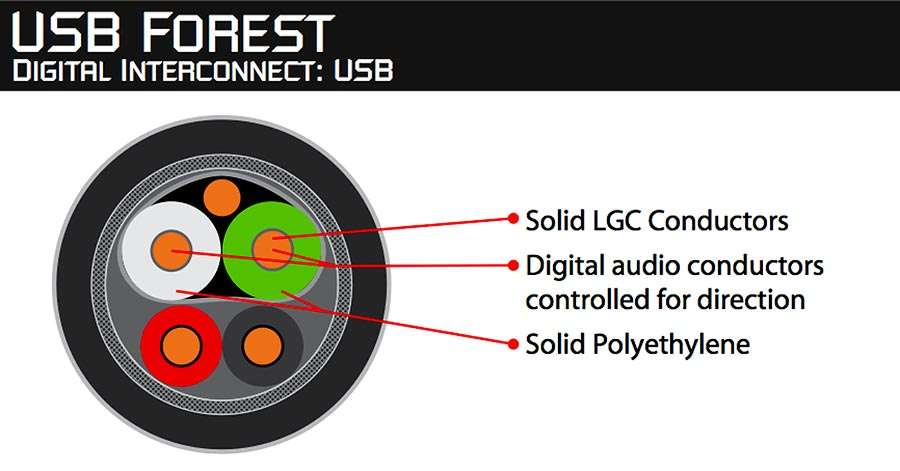
Audioquest Forest USB cable during the last year. I have written three articles about this and other (supposedly) High End cables: "
Hot Vodoo: Audio differences between USB cables - yes, they do exist!" and "
More USB cables - more differences", articles that proved to be highly controversial. The third and last article about USB cables
"Vodoo continued: my final Statement on USB cables" mainly deals with the effects of a ground loop I have been measuring in the older articles. Also, please note that I´m able to apply
my testing methodology only to the line-out but not the headphone output. It goes without saying that I did every single test
not using any of the DSPs the card offers.
Sound with the line-out: The sound of this card is very good for playback. Compared to the reference files the Soundblaster X-Fi HD USB lacks a bit of high frequency gloss or 'air' which diminishes resolution and detail a bit. Bass is stronger than my reference files, that difference is small but noticeable. Speed and snap are marvellous over the whole frequency band, music indeed seem a bit 'faster'. Overall, the dynamics are exaggerated; they aren´t completely natural but riveting nonetheless, more importantly they never veer into strident territory. The stage is fascinating too: while it isn´t as wide as the reference it showcases more depth augmenting holographic impression. I found it very pleasing that the X-Fi HD USB borrows some of its characteristics from the excellent
Sony D-335. The character of the original files is not retained completely, it´s partly replaced by something with a more forward sound. To put it bluntly: music is more fun coming from this card. In conclusion the line-out is not 100 % sonically invisible but for casual listening (or for almost anyone of its users) it´s perfectly suited. Yes, I think that many people will just love the sound the Creative creates (pun intended). Should you be using the stock USB cable the card was equipped with you will however encounter a flatter stage, its already exaggerated dynamic capabilities will turn from engaging to strident. You decide. Here are now my
ratings for the line-out (
Audioquest Forest used):
Sonic Balance:
Dynamics:
Resolution:
Stage / Ambiance:
Character:
Recording quality: the frequency deviation with vinyl signals is noticeable, causing hoarse sounding singers and too much 'air'. It´s also responsible for something best described as a brittle sound my two other RIAA amplifiers - which aren´t very good - lack. On the other hand playback of vinyl is not an exact science because of too many factors producing unreliable results. I can only say that for me the quality is good enough (I´d correct errors anyway). Recording usual line-in signals produces a slightly constricted sound, missing resolution and less dynamics. While this doesn´t sound it isn´t because the overall recording quality is decent. The noise signature of the left channel revealed in my measurments above wasn´t audible.
Sound quality of the headphone output: Despite a way too high output impedance I have yet to encounter imbalanced sound quality with this card using headphones. I seem to have been lucky because my
Sennheiser HD-448 and my
Superlux HD-668B don´t have any problems with high output impedances, according to measurments on
headphone.com they virtually aren´t susceptible to them. Compared to my
FiiO E6 this card amplifies lower frequencies, creating more bass power as a result (without sounding bloated). Secondly, it presents music with more dynamics than it really has, making it a bit more aggressive and by that mirroring the sound of the the line-out. Can high impedance headphones like the
Sennheiser HD-600 be used with it? Not the best idea, the card doesn´t have enough power for power hungry cans like these, the volume that can be reached might be too soft for some. Using the HD-600 in combination with the maximum volume setting creates distortions on transients; the headphone output cannot deliver what my HD-600 'demands'. Using it with a volume setting slightly below the maximum (90-95 %) these distortions are almost absent, yet the music lacks a bit 'body', meaning soloists have less chest. In short this combination sounds a bit thinner and slightly strident. I have not used IEMs or headphones sensitive to high output impedances with this card and I don´t intend to do so - in such cases I recommend to stay away from this card as far as possible.
 |
| Both the HD-448/449 & the HD-668B virtually aren´t susceptible to high output impdances |
Concluding my revised article I can only say that the X-Fi HD USB is a mixture of good and bad. Creative claims that this soundcard is for audiophiles. Experience and research however reveal that this claim merely is wishful thinking of Creatives' marketing division and not grounded in reality. Simply put: the headphone output is crap. I´m sorry to say it as blunt as this, even when I consider that I haven´t had any problems at all. But I use headphones not affected by the high output impedance so I´m forced to ignore my own experience in this case. My point is that you, dear reader, probably don´t know if your headphones react to something like this; with this card you might think that the new and nifty cans you just bought don´t sound very well when in reality it is caused by a mismatch between the X-Fi HD USB and your headphone. You plan on using headphones with impedances higher than 250 Ohms to avoid this problem? Congratulations, you´ve just hit another obstacle because this card is too weak to power them sufficiently. Oh, you intend to play CDs in perfect quality with it? I´m sorry but this isn´t possible either because the lack of support for 44.1 kHz based samplerates forces the Windows audio engine to resample using its not very sophisticated interal resampler. You want to play the newest 88.2 kHz remaster of an ancient Rolling Stones album you just bought on HDTracks to feed it digitally to your very well engineered DAC? I´m very sorry, this is impossible too: Windows resampling kicks in again.
This card is only for you if you can accept a loss in quality - or if you´re using 48 / 96 kHz exclusively, don´t use headphones vulnerable to high output impedance or weak output power and if you plan on correcting frequency errors produced by the RIAA amp needed for vinyl yourself with a high quality EQ. Should you find yourself in the latter description you will get decent manufacturing quality combined with a nifty looking exterior, very decent audio quality on the line-out and tons of DSPs to play with. One thing however is crystal clear: think carefully to which of the two groups you belong for this card is a disappointment in some regards. It took me a year to find out how badly this soundcard performs regarding certain aspects; I subsequently made the decision that this will be my final Creative product. For listening with headphones I can recommend the FiiO E07K 'Andes' warmly, it cannot record, nor does it feature digital in- and outputs, yet it´s impeccably neutral and able to power low impedance headphones competently.

Latest update: 11.01.2013