1. Introduction
Hey babes... today I´ll be talking about high resolution formats / codecs. I will show that even lossy codecs like MP3, AAC or WMA are perfectly able of encoding music in high resolution with spectacular results. I will show you listening tests, graphs and measurement results. I´ll also talk about the necessary requirements so that all of these codecs perform at their very best. I´ll tell you how these codec really sound (minus the usual bullshit). And finally, I´ll give advice how to unleash the best possible quality while using lossy codecs. I won´t talk about FLAC, APE, TAK, ALAC or WavPack... those are all lossless, a.k.a. encode music without taking something away. This article is divided into seperate paragraphs which I´ll mention now so that you might jump to the one interesting you the most:
1. Introduction
2. A bit of lossy history
3. How lossy codecs work
4. Transparency
5. Fairytales - or why MP3 & Co. are HiRes capable
6. Seeing is believing
8. And now... the problem
9. The solution
10. How to make the best MP3s (& Co.) ever!
11. This really is high resolution? Some disadvantages
12. REAL "lossyless" high resolution
13. The sound of noise
14. Transcoding horror
15. Conclusion
2. A bit of lossy history
 |
| Fig. I: Responsible for all the 'mess': Karlheinz Brandenburg (copyright: Wikipedia) |
The guy above did it all: Karlheinz Brandenburg. He was part of a group of scientists at the University of Erlangen-Nuremberg and in 1989 he described in his dissertation several techniques necessary for lossy codecs. The principles he wrote about are the foundations for any lossy codec and they have been in use ever since. Herr Brandenburg is called by many people the 'father' of MP3. In fact, after his dissertation he further developed this codec in cooperation with other scientists at the Fraunhofer Society. Since then, MP3 has become the most dominant codec to store music with. Around the same time (1992) Sony unleashed ATRAC necessary for the MiniDisc, by that catapulting lossy coding into mainstream consciousness. In 1999, Microsoft released WMA in order to have its own MP3-alternative which then could be licensed to partners for loads of money (or so they wished). In the same year, the Fraunhofer Society standardized what was to be the successor to MP3: AAC or MP4 and just like WMA and MP3 the use of this codec costs money. The Xiph.Org foundation followed suit in 2000 with a completely open and free alternative called Vorbis, commonly referred to as OGG. But as I said above, MP3 still is the most used lossy codec even though it´s old and technically inferior to the other codecs (ATRAC is worse).
3. How lossy codecs work
To make it short: they make music smaller while trying to keep sound quality on par with the original they were encoded from. They remove what our ears cannot hear... well, that´s not very precise. They remove parts of the music our ears AND our brain are unable to perceive. 'Perceive' is important as lossy codecs remove information our brain would ignore anyway. Because of this ear/brain combination those codecs are called 'psychoacoustic'; us humans never listen with our ears only, our brain is indeed the biggest part of our hearing. I won´t go into detail describing how lossy codecs are able to shrink filesizes... but have you ever thought about the description 'they remove parts of the music'? In fact, they don´t literally remove those parts; what they do is dynamically decreasing bit depth for certain parts, frequencies or information they deem to be inaudible. For example: if a louder part masks a softer part, lossy codecs decrease bit depth for the soft part to, say, 1 bit (see Fig. II). When you decrease bit depth you create a noisy residue, called quantization noise. The ability of a codec to hide this noise partly determines how transparent it sounds to us.
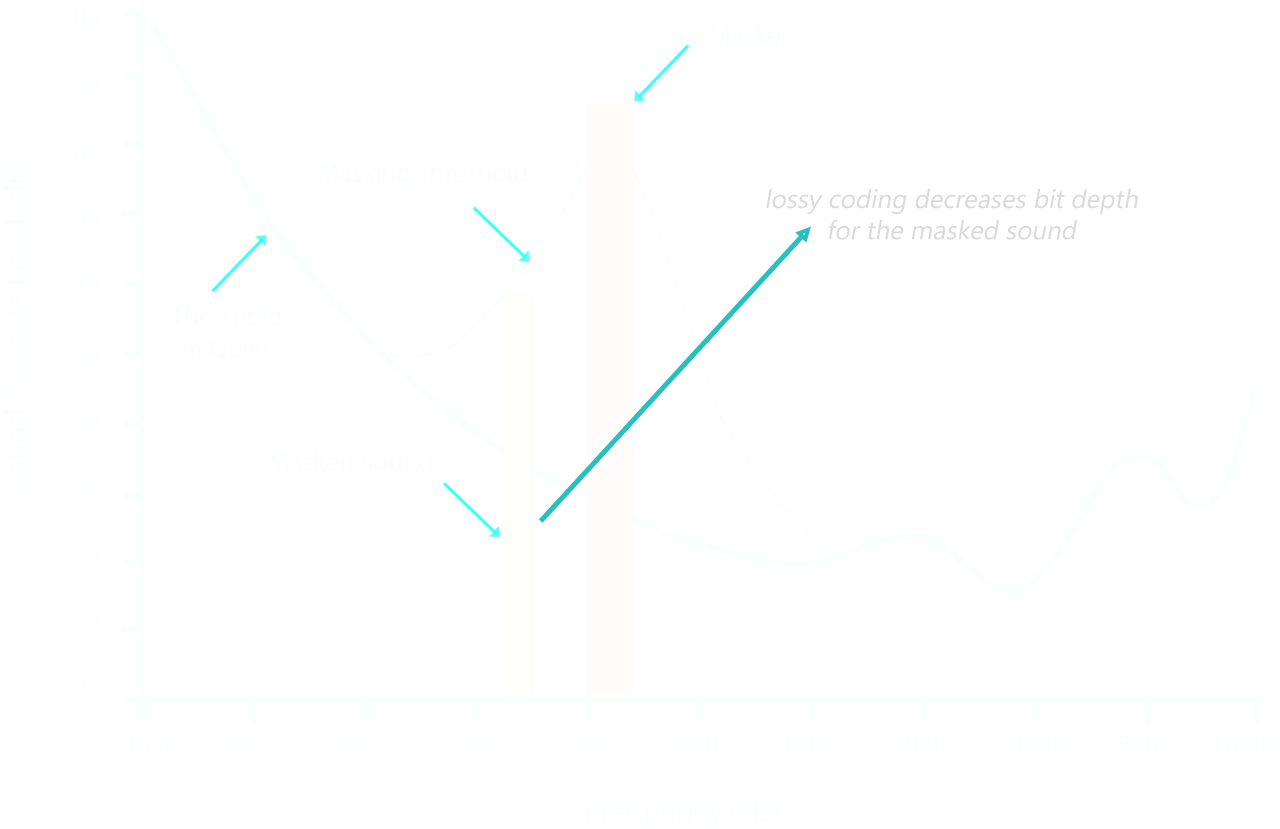 |
| Fig. II: audio masking and subsequent bit depth decreasing (copyright: Wikipedia) |
4. Transparency
If MP3 & Co. are only removing what we cannot perceive anyway, why do we sometimes hear more or less horrible compression artifacts? Well, the sound of a lossy codec basically depends on how efficiently it encodes, on the available bitrate (measured in kBit/s), encoding speed (fast isn´t always best) and if the codec is maintained well (a.k.a. continuously developed). MP3 for example has been in constant development for 20 years, first and foremost in its LAME variant. It is now so good that it reaches transparency for many people with a bitrate as low as 128 kBit/s. 'Transparency' means that the lossy encoding cannot be distinguished from the lossless original it was derived from. In other words, for many people a 128 kBit/s MP3 sounds the same as the original, 11 times bigger 1.411 kBit/s (bitrate of the CD) lossless source. In my opinion that fact not only proves how un-trained the ears (and brains) of casual listeners are, it also serves to point out how good lossy codecs have become. Wouldn´t it be transparent, you´d hear artifacts like flanging, pre-echo, smeared transients, problems with virtual stage, distortions (quantization noise), etc. These artifacts are a problem... for decades now MP3 has "enjoyed" a reputation as bad as the always-bad-stepmother in fairytales. Audiophiles and casual listeners alike constantly claim that MP3 (or any other lossy codec of their choice) sounds cold, lifeless, digital and... yes, compressed; lossy codecs are too often accused of "dumbing down" the sound.
5. Fairytales - or why MP3 & Co. are HiRes-capable
You see, all of this is was the truth. 15-20 years ago. In 2013 it´s indeed like the bad stepmother; a fairytale. Most lossy codecs are far, far better than their reputation. To you this may be surprising, dear constant reader, but they are indeed able to encode high resolution material like 24/44.1, 24/48 or even 24/96.
...
...
...
...
(Pause for dramatic effect)
...
...
...
...
Don´t believe it? Here´s why... all lossy codecs share a common trait: they encode any audio material not with static integer but with floating point values. You may remember that I talked for hours and hours about the ability of the MiniDisc to encode audio signals with a quality surpassing that of CDs. It´s exactly the same with MP3 & Co.: since they all employ floating point precision, the bit depth fed to the encoder's input is irrelevant, they will encode anything, whether it´s 16 bit, 24 bit or 32 bit.
...
...
...
...
(Pause for dramatic effect)
...
...
...
...
Don´t believe it? Here´s why... all lossy codecs share a common trait: they encode any audio material not with static integer but with floating point values. You may remember that I talked for hours and hours about the ability of the MiniDisc to encode audio signals with a quality surpassing that of CDs. It´s exactly the same with MP3 & Co.: since they all employ floating point precision, the bit depth fed to the encoder's input is irrelevant, they will encode anything, whether it´s 16 bit, 24 bit or 32 bit.
What´s the difference between integer and floating point? Integer handles values like this: 23, 45, 156, 001, etc. Floating point is like this: 7,89654367, 674,342167, 55,236548955214587, etc.... you get the idea. It is able to work with higher precision since it allows for much more possible values than integer (or fixed point). The results are a gigantic dynamic range and a spectacular signal-to-noise ratio. For 24 bit integer you have a (quantization) noisefloor as low as -144 dB, for 32 bit floating point it´s at a stunning -202 dB.
6. Seeing is believing
The first graph below presents a tiny sine at 1.000 Hz with a level of -90 dB on an original 24/48 wave file (-> lossless, see Fig. III). This is so low-level that you won´t ever hear it. But you can see that the sine still looks like a perfect sine. 24 bit obviously allows for enough possible values for any signal at -90 dB to be properly represented, no wonder considering a signal-to-noise ratio of -144 dB. The next graph (Fig. IV) shows the same signal, though this time encoded with 16 bit. The situation now changes: this low-level signal gets very close to the -96 dB noisefloor limit of a common 16 bit system. In place of a sine you now have the very famous 'digital staircases' signal so often used to (mis-)represent supposed flaws of any digital system.
 |
| Fig. III: 1.000 Hz sine, -90 dB, 24/48 WAVE |
 |
| Fig. IV: 1.000 Hz sine, -90 dB, 16/48 WAVE |
Now let´s have a look at several codecs. Are they able to encode with high resolution so that the sine will look like Fig. III? Please be aware that I used only the latest codec versions; I also employed their highest possible bitrate. In case of MP3 (LAME) that´s 320 kBit/s, for AAC (Apple's implementation) it´s 320 kBit/s as well and for WMA Professional it´s 440 kBit/s.
 |
| Fig. V: MP3 320 kBit/s, 1.000 Hz sine, -90 dB, 32/48 |
 |
| Fig. VI: AAC 320 kBit/s, 1.000 Hz sine, -90 dB, 32/48 |
 |
| Fig. VII: WMA Professional 440 kBit/s, 1.000 Hz sine, -90 dB, 24/48 |
Duh! The three graphs (Fig. V to VII) prove that we have true 24 bit resolution with every lossy codec represented here. Not one of the sines looks like Fig. IV. As I said: high resolution - despite lossy compression by a factor of 7. Wanna hear a word from the inventor of MP3, Herr Brandenburg (the guy up above), regarding this?
There are some kinds of deficiencies of standard audio equipment which cannot be found in properly designed Layer-3 and AAC codecs. They are listed here to mention the fact that it does not make sense to test for them. Most noticable are Dynamic range: MP3 and AAC both contain a global gain adjustment parameter for every block of music data. According to the word length and resolution of this parameter, the dynamic range of both MP3 and AAC is well beyond the equivalent of a 24 bit D/A resolution. In short, MP3 and AAC represent the music in a way that the dynamic range of every known audio source is perfectly retained. (Source)High resolution again, he´s well aware of it. Of course he is, he developed it. But how will all those lossy codecs react to those plain old measurement signals he describes as unneccesary? I mean, lossy codecs are designed to work very well with music. Measurements are entirely different... those don´t fully adhere to all the psychoacoustic principles so vital to every lossy codec so effectivey they should measure horribly. To find out how they react to these difficult conditions I used RMAA and compared all encodings to the original .wav file they were derived from (a 32/48 kHz file). Therefore, the resulting, decoded test files were at 32/48 too (WMA Professional: 24/48). Look below at Fig. VIII and see for yourself how they managed to deal with this situation.
I have to repeat that lossy codecs behave worse with measurement signals, they are simply not developed for this kind of signal.
 |
| Fig. VIII |
Duh... again. Think about it: roughly 90% of the test signal has been removed... gone forever... Poof! (WMA Professional: 80%) - yet they still perform so fuckin' well... and of all things with signals they aren´t even designed to encode well! But you probably glimpsed that there are quality differences between all those codecs. OGG for example ends up badly, this is due to OGG not being revised often enough. The same goes for WMA Professional; while it clearly is one of the winners in this contest it has an advantage because of its comparably high bitrate. Ironically, the oldest codec, MP3, fares best in RMAA's quality assessments. The picture changes somewhat when one looks at the graphs... to make a long story short, the best codec is AAC as used and continiously developed by Apple for iTunes. The AAC version from Nero isn´t able to hold up that well, again caused by long pauses in development.
7. Listening to differences
Measurements are one thing, listening to results another... and I´ll simply show you the residue that is produced when MP3 encodes music. I chose something you might already know, a song you´d hear on the radio: Woman's World (-> video) by Cher from her first album in 12 years, Closer to the Truth. The residue is called - see above - quantization noise, in this case mixed with imprecisions produced by the filterbanks MP3 needs to find out what it might erase. These quantization artifacts are usually hidden by the music itself (this is supposed to be that way). In order to reveal how MP3 works I simply inverted the phase of the original 32/48 .wav source file and mixed it with the decoded MP3 file. Et voilà, every little speck of dirt MP3 produced for this file is subsequently revealed. I didn´t alter the gain of this file, the level you´re hearing is the actual level of the errors within the MP3 file. Now, for those who´ll now say "Very loud... and that´s exactly why MP3 sucks big time" I can only say that you´re stupid. Just consider for a moment how our ears & brain perceive sounds and have a look at this: the RMS-level of the original file is -15 dB, the residue has an RMS-level of only -43 dB. A gain reduction of just 6 dB feels to our ear / brain half as loud. I think, you can do the math yourself.
Again: you cannot use this noise to point out how badly any lossy codec performs - it´s how it´s supposed to work, nothing else. As I said: (with a high enough bitrate) usually these artifacts are hidden and inaudible.
Update 30.03.15: Soundcloud used to host the audiofile containing the compression artifacts. But just this day, Soundcloud decided to delete everything I ever uploaded because their automated content protection system detected several breaches of copyright.
Well, of course it did! For my reviews I need to listen to music and in order to make sound differences available to you, dear Reader, I uploaded several samples, each of them - at max - 30 seconds long. Naturally, this isn´t a breach of copyright, because a) I don´t have a commercial agenda nor background for this blog and b) I don´t advertise filesharers nor do I encourage to download things illegally. I don´t even want to mention, that only 30 seconds (!) of a particular song or piece are far too short to be enjoyed properly by anyone who attempts to be an illegal asshole. Yet Soundcloud fears the lables and their paranoia of copyright breaches which in turn prompts them to be paranoid and incompetent ninnies themselves.
I hate paranoia, I don´t want to have anything to do with stupid people / companies and everything was deleted anyway... so I decided to delete my Soundcloud account. Sorry for that, dear Reader.
8. And now... the problem
All of this would be marvellous... if all those nifty lossy codecs would be decoded properly. Have you ever heard about a digital audio player or a smartphone that decodes lossy codecs with 32 bit floating point precision? See, neither have I. And that´s where the beast rears its ugly head: if they aren´t decoded with full precision they produce strong, additional quantization distortions NOT contained inside the signal itself. Software players for the PC usually don´t suffer from this malady, foobar2000, Winamp or JRiver decode MP3 & Co. with full floating point precision for simple playback. This makes perfect sense because the aforementioned softwares work internally with 32 or 64 bit floating point precision anyway (for DSPs, volume control, etc.). JRiver deemed this issue so important that they opened a thread in their forum, talking about it. But should you attempt a conversion from MP3 to WAVE, the basic problem is resurrected, meandering around again like a zombified corpse. Foobar2000 for example assumes that every lossy file was derived from CD; using the 'Auto' bit depth configuration in its converter dialogue converts everything lossy to 16 bit, whether it´s MP3, OGG, AAC or WMA (see Fig. IX). High resolution? Forget it. The same goes for the usually wonderful software dBpoweramp: floating point decoding has to be activated under advanced options (Fig. X).
 |
| Fig. IX: foobar2000 converter dialogue |
 |
| Fig. X: dBpoweramp configuration, advanced dialogue |
By all means, the 16 bit, quasi-standard decoding of MP3 & Co. isn´t a good thing. Imagine a CD you ripped yourself to MP3; these files were derived from a normal 16 bit source. 16 bit decoding should be enough then, right? Should, but is not. While the decoded data boasts the sources' original bit depth again, something new and eerie has been added... and I don´t mean the inlying compression errors produced by the encoder. No, this thing from the crypt is additional quantization noise produced by the decoder. Cause: truncating floating point values to integer values. These additional artifacts are produced only because the decoder works at half speed and with half of its options. Look at the graphs below:
 |
| Fig. XI: original, lossless 16 bit wavefile for comparison |
 |
| Fig. XII: MP3, decoded with 32 bit floating point |
 |
| Fig. XIII: MP3, decoded with 16 bit integer |
Doesn´t look so bad, you´re saying? Well, then look again at the signal causing the noise, it´s a simple 1.000 Hz sine only. Fig. XI shows an original, lossless 16 bit wavefile, the quantization noise is evenly distributed across the spectrum. Fig. XII shows an MP3 file that has been decoded with floating point precision and while there are distortions, those are well below audible levels; most of them are at frequencies we cannot hear well. Fig. XIII shows the same file, this time decoded truncated to 16 bit integer. The artifacts have doubled - and only because they were decoded with 16 bits instead of 32 bit floating point. They might still be inaudible... but I´m not sure because now we have additional aliases at frequencies where us humans can hear extremely well. These distortions will be added by the stupid integer decoding, and it doesn´t matter if you have created those lossy files yourself or bought them at some online store. You´ve probably been listening to quantization artifacts all your life, errors produced by dumb decoding of portable players and stupid software. Even files encoded with WMA Professional, files that are clearly marked as being 24 bit by their data stream, suffer from erroneous decoding as most software decodes it to 16 bit only. I´m looking at you, foobar2000. Just because you´ve been programmed by people who give a shit about proprietary, 'bad' software coming from Microsoft, this still doesn´t mean that you have to behave like a silly goose.
9. The solution
I´m afraid that for the time being there is no solution. Companies producing digital audio players don´t seem to be aware of the problem or they just assume that your average-joe won´t notice it. Well, at least you can do something about it when decoding those files yourself with software. Just have a look at dBpoweramp again (Fig. X above) and configure it to decode MP3, AAC or OGG as 32 bit floating point or 24 bit. Do the same with foobar2000 in the converter dialogue (see Fig. IX) and change the output bit depth to '32' or '24', it´ll then decode lossy formats to their full potential when converting files to HDD. But there´s hope that this problem gains attention... people like Bob Katz who´s a mastering engineer and important enough to maybe excert some influence, mentioned this problem in a recent thread at the JRiver forum. Yeah, he was talking about dithering but at the same time he was fully aware that for MP3 & Co. it´s imperative that they are decoded properly and that decoding those lossy codecs with anything else than floating point will result in truncating values which in turn produces the aforementioned artifacts. He wrote:
"Did you know that all current Lame and Fraunhofer and Apple AAC and MP3 decoders run internally at 32-bit floating point? In fact, if you take a "16-bit" source AAC file and reproduce it through the AAC decoder, it produces a 32-bit float output word! If it was a very good encoding, you will lose audible depth if you reproduce it at 16-bit because more than 16-bits come out of the decoder. The output of an AAC decoder should therefore be dithered down from 32-bit float to 24-bits for best reproduction. Almost NO ONE does that, but they should, and I've heard the audible difference when I play AAC in an engine that permits that."
Thank you, Bob, exactly what I´ve been saying! At least someone acknowledges it. I won´t dither to 24 bit but each to his own (I´m not too fond of dithering to 24 bit, using a bit depth like this renders quantization-related problems moot). From now on, I will mention if digital players (portable CD players for example) are able to decode MP3 properly.
10. How to make the best MP3s (& Co.) ever!
In the meantime I´ll present some advice everyone encoding her/himself might find useful. I´ll also recommend the best sounding codec to you, based on my own personal experience. Please be aware that my suggestions will cause any encoding to take longer, if you don´t have the time to wait for the encoder, then don´t even bother. But then you´re not interested in best sound anyway, or are you?
First of all, all those nifty codecs are command line based, on a Windows PC they look like plain old DOS. Usually you can´t see this as the command line window is hidden by the software employing those decoders/encoders. But it nevertheless enables you to make everything yourself by using your keyboard... though I admit that it isn´t very convenient. So we´ll use nice, flashy software instead. The following encoding tips and setups will depend on the codec of your choice; in some cases their setup might be complicated for noobs but once you´ve done it correctly you won´t need to bother with it anymore.
MP3 (LAME)
One of the best and most versatile softwares around the net is the aforementioned dBpoweramp. It costs money but I can recommend it without reservations. It´s a powerful encoder/decoder for any format you can think of, it contains one of the best available CD rippers and its powerful talents are hidden inside an easy looking package. Even better, the CEO of Illustrate (company maintaining dBpoweramp) is a nice guy, discussing things and giving advice in his own forum and on hydrogenaudio. A free alternative would be xrecode II (shareware with a nag screen) but it´s buggy and inconvenient - use at your own risk. So, in case you want to use MP3 and in order to create the best sounding MP3s ever I recommend these encoding settings (Fig. XIV):
 |
| Fig. XIV: best encoding settings for MP3 (LAME) |
If you´d like to use a different frontend for the command line based encoder/decoder instead (xrecode II for example) I´ll now give you the commands so that you may copy and paste them:
-b 320 -q 0 --noreplaygain
The most important part is the '-q' switch, it configures the 'quality' option of the LAME MP3 encoder. The standard setting advertised by hydrogenaudio is '-q 2' but we want a choice and the best quality so we opt to set it ourselves. Why the constant bit rate (CBR) of 320 kBit/s when Hydrogenaudio recommends variable bit rate (VBR) in order to save on storage space? Think about it: 60 minutes of music occupy 137 megabytes when encoded with 320 kBit/s CBR. For VBR with an average of 240 kBit/s these 60 minutes take roughly 108 megabytes. A difference of 29 megabyte. In 2013, two to three photos on a smartphone alone consume this. We have to be realistic here: it might have been an issue 10 or even 5 years ago but nowadays with an abundance of storage space anywhere, surely we can afford bigger files. Furthermore, MP3 profits from more bitrate, no matter what the skeptics (hello, my dear hydrogenaudio-ists) are saying. More on sound issues later.
WMA Professional
 |
| Fig. XIV: best encoding settings for WMA Professional |
I wouldn´t recommend WMA Standard as WMA Professional is superior in every way, it´s also the one codec officially supporting 24 bit output. Which is a fake of course, Microsoft just embedded an additional integer decoding option, internally it works with floating point just like other codecs. As a quality option, you should always use 2 pass encoding, it yields audibly superior results. Compared to MP3 above, 60 minutes of music occupy more space because of the highest 440 kBit/s setting: 189 megabytes. Should you really be concerned about storage requirements, using 384 kBit/s would work too, it´ll still sound well. None of this however hides the fact that WMA Professional enjoys close to zero hardware support. Most portable devices are able to play WMA Standard only - and I can´t recommend that one.
AAC (Apple)
Instead of using an old or proprietary codec I´ll recommend one of the most recent instead, one that also comes with ample hardware support by almost every manufacturer: AAC. Be advised that it now gets inconvenient. To make it easy, you could of course use the AAC codec from Nero (with dBpoweramp for example) but I´d advise against it; the one from Apple included with iTunes is much better (and it shames me to write this as I don´t like Apple). There´s only one way to unleash the iTunes encoder (or more precisely: the QuickTime encoder) with the best quality options: qtaacenc (get it here). You´d have to setup foobar2000 like this (Fig. XV):
 |
| Fig. XV: foobar2000 setup for qtaacenc |
Just like with MP3 there´s a quality setting allowing for better-than-standard results (the standard settings are used by Apple for music they sell through the iTunes store): it´s simply called '--highest' (another source says '--high'). Don´t forget to instruct foobar2000 to use 32 bit during encoding, you now know well that AAC can handle it. Anyway, here are the commands in case you want something else besides foobar:
--cbr 320 --highest
11. This really is high resolution? Some disadvantages
MP3 and AAC (Apple) have one big disadvantage: they aren´t able to handle samplerates beyond 48 kHz. For those there´s only one codec left: WMA Professional. AAC (Nero) can handle 96 kHz too... but as I said above it´s not very good. Furthermore, devices usually able to handle AAC will react in strange ways (or not at all) when trying to play those 96 kHz AAC files. So you might want to use WMA Professional. But its main problem hasn´t changed: hardware support is extremely limited, not even software properly recognizes it.
What lossy codec to use depends on what you yourself consider to be high resolution. To me, HiRes starts with 24/48, for others it starts with 24/44.1. Strictly speaking, everything that´s not CD is high resolution. Take HDTracks: they sell even 24/44.1 as high resolution. More than one third of the music they´re offering is at 24/44.1 or 24/48. For those releases lossy codecs would be the perfect choice if you could ensure proper decoding on playback. And if you want to save on storage space, you might consider resampling your 96 kHz albums to 48 kHz and encode the result it with AAC or MP3.
But the best combination to save space and keep any file at its original resolution is... not FLAC. Have you ever heard about WavPack? Thought so. WavPack normally is, just like FLAC or APE, a completely lossless encoder/decoder that won´t ever touch the material it encodes. But it has a second, not so well known setting: WavPack lossy ('hybrid' is the correct designation). This 'lossy' mode is unlike MP3, AAC or WMA, it won´t remove anything within the music. As I said, the other lossy codecs work psychoacoustically and 'hack' into the frequency band at countless places, removing what cannot be perceived. WavPack lossy ignores psychoacoustics and does only this: reducing overall bitdepth of the file according to its level and distribution of frequencies.
Let´s assume a 24 bit file with lots of loud and soft parts. With WavPack lossy the soft parts will retain close to 24 bit resolution, loud parts will be reduced to 16-20 bit resolution. The resulting quantization noise is then moved by a very tame noiseshaper towards high frequencies where it cannot be perceived anymore. Very much like SACD. Unlike SACD though, bit depth isn´t static. WavPack lossy can be described as a 'dynamic bit depth decreaser'. In that respect it also differs from other lossy codecs; with them bitdepth changes a lot within frequencies, with WavPack lossy only from one level change to the next. It truly preserves the full bandwidth and dynamic range of high resolution material and in my experience, the added quantization noise remains completely inaudible. Remember the MP3 noise sample up above? If I would have extracted the artifacts of a WavPack lossy-encoded file, I´d have been required to raise the level by +50 dB to make them even audible!
Please refer to Fig. XVI above where three lossy codecs have to compete against their own source. While WMA Professional is superior to AAC Nero, it´s WavPack lossy winning the contest. It measures almost exactly like the original. Yet it´s 7 times smaller than the WAVE file it was produced from (1.200 kBit/s against 6.144 kBit/s). See Fig. XVII & Fig. XVIII for details.
Because of its noiseshaping feature, WavPack lossy is ideally suited for encoding anything beyond 48 kHz. If you employ the '-x6' switch, you can exploit this further. Using this switch, I´ve found out during many hours of testing that WavPack lossy is fully transparent with 96 kHz material the moment the bitrate exceeds 1.000 kBit/s. Because of that I always use it with 1.200 kBit/s, as an additional security I also employ the '-h' switch (high quality). However, encoding takes forever. To me, this doesn´t matter; I only encode those files once and never touch them again. But with you it might be different - so you decide.
Fig. XIX presents my recommended settings for 96 kHz material using the WavPack frontend (for convenience I would´ve loved to recommend foobar2000 or dBpoweramp... but both won´t allow extra commandline switches - as it appears, foobar2000 now can. Very convenient, because it´ll use all your CPUs cores for additional encoding speed). The 'Extra Option' -x6 is most important to achieve the best possible quality... but using it will prolong encoding time (no kidding; while you wait, you could write a novel). The same goes for the '-h' switch and because it´ll also prolong time needed for decoding, it´s optional and not mentioned anymore. Anyway, for 44.1 / 48 kHz those 1.200 kBit/s are overkill, for 176,4 / 192 kHz they aren´t enough. That´s why the bitrate needs to be tailored to the samplerate:
12. REAL "lossyless" high resolution
But the best combination to save space and keep any file at its original resolution is... not FLAC. Have you ever heard about WavPack? Thought so. WavPack normally is, just like FLAC or APE, a completely lossless encoder/decoder that won´t ever touch the material it encodes. But it has a second, not so well known setting: WavPack lossy ('hybrid' is the correct designation). This 'lossy' mode is unlike MP3, AAC or WMA, it won´t remove anything within the music. As I said, the other lossy codecs work psychoacoustically and 'hack' into the frequency band at countless places, removing what cannot be perceived. WavPack lossy ignores psychoacoustics and does only this: reducing overall bitdepth of the file according to its level and distribution of frequencies.
Let´s assume a 24 bit file with lots of loud and soft parts. With WavPack lossy the soft parts will retain close to 24 bit resolution, loud parts will be reduced to 16-20 bit resolution. The resulting quantization noise is then moved by a very tame noiseshaper towards high frequencies where it cannot be perceived anymore. Very much like SACD. Unlike SACD though, bit depth isn´t static. WavPack lossy can be described as a 'dynamic bit depth decreaser'. In that respect it also differs from other lossy codecs; with them bitdepth changes a lot within frequencies, with WavPack lossy only from one level change to the next. It truly preserves the full bandwidth and dynamic range of high resolution material and in my experience, the added quantization noise remains completely inaudible. Remember the MP3 noise sample up above? If I would have extracted the artifacts of a WavPack lossy-encoded file, I´d have been required to raise the level by +50 dB to make them even audible!
 |
| Fig. XVI: RMAA chart comparing several lossy codec against their lossless source |
 |
| Fig. XVII: total harmonic distortions - WAVE and WavPack lossy are the clear winner |
 |
| Fig. XVIII: intermodulation distortions - WAVE & WavPack lossy measure the same |
 |
| Fig. XIX: WavPack frontend with my recommended settings for best lossy quality |
44.1 / 48 kHz:
bitrate: 500-600 kB/s, switches: -x6 (optional)
88.2 / 96 kHz:
bitrate: 1.000-1.200 kB/s, switches: -x6
176,4 / 192 kHz:
bitrate: 2.000-2.400 kB/s, switches: -x6
13. The sound of noise
One of the most important questions of this article is how lossy codecs sound. And I don´t mean what the mainstream public thinks they are sounding which can be answered easily: cold, digital and lifeless (yet all use them - a mystery?). No, I mean the actual sound quality. I´ve said above that lossy codecs are far better than their reputation. BUT: you have to make sure to extract the best possible quality when using them! Please consider my encoding suggestions above again and remember that they take time but are worth every second spent on them. The best encoding isn´t the one that is the fastest (C'mon... a whole album encoded in 40 seconds... really?). To make it simple: the higher the quality, the longer it´ll take to encode. Just deal with it. Back to topic... if you used the best encoding options along with the highest bitrates and if you decoded all these files correctly (-> floating point) the sound of several lossy codecs is like this:
WavPack lossy: perfect. Using bitrates of roughly 1.200 kBit/s with 24/96 in combination with the -x6 switch it sounds exactly like the original. Always. Very limited hardware support... software support is good though. I have been archiving every bit of music with WavPack lossy since 2008 and I´ve never looked back. Not suited for portable use (for lack of hardware support), but perfectly suited for archiving and transcoding to other codecs like the ones below.
AAC (Apple): might produce instable staging, instruments occasionally seem to change size and position. Yet this happens so rarely that I could have been imagining it. Otherwise it´s completely devoid of artifacts. Sounds O.K. enough with lower bit rates. Hardware support is phenomenal. Simply the best mixture of convenience and good sound, therefore highly recommended for portable use.
MP3: slightly 'dark', 'warm'. Somtimes sounds too dry, as if reverb has been reduced (especially audible with VBR). Smeared transients are another problem. No matter the bitrate, MP3 will always have difficulties encoding really short and tiny transients (the sample size for short blocks isn´t small enough). However, in 85-90% of all cases all of this isn´t audible at all. The danger of typical problems like metallic sizzling, flanging, etc. completely disappears if you use the highest bitrate of 320 kBit/s. Of course, using LAME avoids most problems anyway compared to other MP3 encoders. Hardware support? A 100%.
WMA Professional: on occasion creates instable staging worse than AAC (Apple). Instruments might change size and place, dimensions shrink or expand sometimes. This depends very much on the material, in many cases it´s completely inaudible. When used with 96 kHz, sound is too mellow. Otherwise it´s one of the most neutral and artifact free codecs available. Hardware support: laughable.
AAC (Nero): like WMA Professional, only (much) worse. Instruments always move around slightly, sizes vary as well, dimensions shrink and expand constantly. Furthermore, the sound feels 'blown up' at lower mids. Despite being much more recent and advanced than MP3 (LAME), it doesn´t sound remotely as good. Hardware support is - naturally - the same as for AAC (Apple).
WMA Standard: sizzles. Even with higher bitrates. On the other hand it enjoys almost the same hardware compatibility as MP3. I still can´t recommend it, it just isn´t good enough.
OGG: was my standard choice more than 8 years ago. Shouldn´t be used nowadays. Obscures much of the virtual stage, sounds harsh (this is the only codec sounding literally 'digital'). Sounded different back in 2005: very beautiful and pleasant. Ignore it.
14. Transcoding Horror
If there´s one thing I hate, hate, hate people doing it´s transcoding from one lossy codec to another... or from 128 kBit/s to 320 kBit/s. You cannot imagine how many think that it actually improves quality - see here & here (I´ve found countless other examples, but they´re in German and my native language is a bitch for most people). The only thing it does is hurting quality immensely. To the encoder, the file that was compressed before is just a new file and it´s treated as such. Example: the really loud encoding artifacts within a 128 kBit/s MP3 are simply treated as they are, to the encoder they are just new musical information, a seemingly natural part of the music. You see, not one encoder in the world can distinguish between noise, artifacts or music... which means that artifacts are now treated as music. Back in 1999, when Microsoft tried to advertise its WMA Standard codec as superior to MP3 out of licensing greed, they tried to fool everyone to re-encode their MP3s to WMA. For this stupidity they should have been shot... so please, don´t you ever transcode from MP3 to MP3, AAC, WMA or OGG. The only allowed trancoding is one from WavPack lossy to another lossy codec (preferrably not WavPack lossy again).
15. Conclusion
My dear constant reader, I don´t know where you´re coming from, if you´re an audiophile, a skeptic or just feeling lucky to be here. But I know one thing: if MP3 & Co. would be sounding horrible no one would use lossy coding in the first place. If you´re an audiophile, do you really think that half of the earth's population fell for a ruse invented by some German scientist in order to 'dumb down' the sound of music? Then let me tell you that all the