I´m sorry that it took me so long to write a new Article. The reason for an absence several months long is that I bought new parts for our PC which is also the reason why I won´t talk about audio stuff today... well, at least not directy. You see, my trusted ASUS Xonar Essence ST doesn´t work anymore and I´ve decided to sell it. It´s not broken, it functions extremely well - just not in combination with the new PC parts. But let´s start with the reason for the purchase of the new parts.
During the last months of the past year I´ve encountered several never before seen errors which even included three BSODs (I was shocked since I´d last seen a BSOD with Windows XP). Programs crashed or misbehaved, all without an obvious reason, something they never did in the months before. I always take care of our system, avoiding unnecessary installations, defragmenting with the best program, cleaning up the registry (by hand, mind you!) etc. so I wasn´t prepared for this. But the error codes of the BSODs pointed towards a problem with the RAM. So I thought "Allright, the RAM is broken. Happens a lot." As skeptical as I am I tested it with Memtest86+ which immediately confirmed that my RAM was broken. Another pass with the program however produced errors at a different address area, the same thing happened with a third pass. I therefore concluded that the RAM was ok but that the mainboard was faulty instead. To confirm this I opened the PC case while the PC was running and touched the RAM slightly from the top - this caused another BSOD immediately, the error code again pointing to the RAM. By know I knew of course that the mainboard instead of the RAM was broken and needed replacement soon. But where do you get a decent mainboard equipped with a Socket 775 for Intel Core processors at the end of the year 2012?
 |
| AMD Fusion - my new system architecture |
Bingo, it´s impossible since this socket was phased out last year along with the matching CPUs. To purchase a used mainboard wasn´t an option for me so I started thinking about a completely new system, keeping only the case, the HDD and the power supply. After much deliberation I decided for an AMD-based system, to be precise, an APU (Accelerated Processing Unit) formerly called "Fusion". This APU combines a common CPU and a GPU (Graphic Processing Unit) into a package as small as a usual processor. This whole architecture is not unlike those found in recent smartphones where they are called SoC (System on Chip). Why didn´t I continue to use an Intel based design when I was so happy with it? For one I´ve always admired that AMD is kind of the underdog when it comes to processors, secondly because the Fusion architecture is better suited to my needs. But first things first. In 2011 AMD introduced their new "Bulldozer" CPU architecture which completely revamps the approach of combining several cores into one processor by using so-called "modules" (or "Clustered Multi Thread"). Utilizing this design a four core processor would basically use two modules with each module containing two integer clusters (cores) and just one floating point unit. This design aims at reducing power consumption while having a very fast processing speed at the same time.
 |
| The new parts for the PC |
However, this new module architecture wasn´t well received when it hit the market in October 2011. Processing speed wasn´t on par with similarly priced Intel CPUs, power consumption was (much) higher as well. According to many reviews this design isn´t capable of high single-threaded processing power - yet. Curiously, these new CPUs were running fast as hell on Linux but slow on Windows. The latter doesn´t seem to be optimized that much to fully utilize the processing power of a CPU aimed at multithreaded calculations. Anyway, in 2012 this design was improved; now it´s called "Piledriver" and this update brought a slight increase of processing power as well as reduced power consumption. It is this altered design I finally decided on, in my case called "Trinity" (sadly, it doesn´t look like Carrie-Ann Moss). Up above I wrote that this APU is better suited to my needs than a comparable Intel design. For one, the AMD APUs include a very powerful GPU which enabled me to perform energy efficient video encoding (do you really think I only have audio as a hobby?) by using GPU acceleration. I also wanted to have a system as simple as possible without a graphic card, a system that was powerful nonetheless. Furthermore, Intel products are traditionally more expensive so purchasing a cheaper AMD solution seemed to be a more reasonable approach. You can see the new parts on the picture above, a detailed list along with a list of my old parts follows now:
New system
- 2x G.Skill Ares RAM (DDR3 2133, 16 Gigabyte)
- ASRock FM2A75 Pro4
- AMD A8-5600K
- Intel 330 SSD (128 Gigabyte)
- Noctua NH-U9B SE2
- Inline SATA-cable (shielded)
Old system
- 2x GEiL Value (DDR2, 8 Gigabyte)
- ASUS P5Q SE Plus
- Intel Core2Quad 8400
- Western Digital WD6400AARS (640 Gigabyte)
- Noctua NH-U9B
- Club3D HD4650 (passive Graphic card)
- Silverstone CP04 SATA-cable (shielded)
The old system had a combined cost of roughly 500,- Euros while the new system cost roughly 410,- Euros. The difference doesn´t seem big - unless you consider that the new PC has twice as much RAM and also contains an SSD instead of a common magnetic HDD. The Intel processor alone cost 133,- Euros (AMD A8-5600K: 93,- Euros). The new system however is not without flaw as you will find out soon. When my boyfriend and I ordered the parts I didn´t expect an increase in speed when it comes to raw processing power; from all I´ve read the new AMD APU was supposedly calculating as slow as a turtle; an actual entry-level CPU. 70% of the reviews I´ve read either pointed out that a competing Intel processor would be faster and less power hungry or that the AMD design was faulty from the beginning. Only very few reviews mentioned that an Intel system would need a powerful graphic card to be able to compete fully with the AMD, they also didn´t forget that the AMD approach of mighty multi-threaded processing power actually is the more advanced design better suited for future applications. AMD plans to make the GPU part a full member of the processing ensemble by giving it tasks usually assigned to a classical CPU, in the future the APU itself is supposed to decide on the best use for either CPU or GPU. In the end I wanted to sample AMD technology myself, I wanted to play around with GPU acceleration AND save power at the same time.
 |
| CPU cooler, RAM, Fan and Power supply |
When the system was finally assembled it didn´t take long for me to discover that processing power actually had increased so much that it was baffling; I expected a worse performance remembering all the bad reviews I´ve read. Example: I made the error of assembling the system and forgetting to change the HDD the system is supposed to boot from with the result that it booted using my old, Intel-based Windows installation. For experts this shouldn´t come as a surprise but I expected that Windows would not be able to manage a complete change of the system architecture. Imagine my surprise when instead my old installation started as if nothing had happened. Of course, many drivers had to be installed but Windows Update performed that part admirably. Which means: before I installed Windows again I used my old system a bit which was still running from my Western Digital HDD - the improvement in speed was noticeable even on easy tasks as for example surfing the net. Everything not only was faster, it also felt that way: responsiveness of the whole system had improved by a large margin. I don´t need to tell you that it turned into a blazingly fast machine after installing it anew on my Intel SSD, I´ve experienced speeds I´ve until then believed wouldn´t be possible.
 |
| WEI (Windows Experience Index) for the new system |
You can see the results of the WEI above. For comparison here´s the performance of my old system: CPU Score 7.2, RAM Score 7.2, Graphics Score 4.3, Gaming Score 6.2, HDD Score 5.9. The CPU score didn´t increase as much as I expected it to, from how the system now feels when it comes to responsiveness I would have guessed a 7.4. But this shows that the WEI uses a logarithmic scale; more details are revealed when running theoretical benchmarks:
 |
| Passmark PerformanceTest 7.0 comparison of old system against the new one |
The picture above shows that the CPU actually performs roughly 80% faster than the old system. Everything else is faster too though the most obvious increase in speed comes from the SSD of course. Nonetheless I was surprised that this supposedly slow AMD processor performs this well. What you cannot see however is that the floating point performance of this CPU is only marginally faster than before which is caused by the availability of only two floating point units. Equally invisible is the single threaded performance which seems to be worse compared to the old Intel when considering efficiency per clock cycle (the AMD is faster but only because it clocks at 3.6 Ghz instead of 2.66 Ghz of the Intel). Nonetheless this is very impressive wouldn´t you say? Real world examples like for instance video encoding are three times as fast as before - and I´ve not even used GPU acceleration yet. Audio processing is faster as well though that depends on the individual program and whether it uses the integer or floating point units of the APU. But what about power consumption? My old system desired roughly 70 Watts when idling and 225 Watts when CPU and Graphic card were fully utilized. Compare that to the 40 Watts for the new system (idle) and 170 Watts (CPU and GPU under full load). A comparable Intel system would perform superior but it´s needless to say that an Intel system would draw as much power as my AMD system should it have a seperate graphic card of equal processing power. I also succeeded in having a small, not very complex system:
 |
| Almost empty - yes, this is a fully working PC |
Wait... it´s empty? But where is the ASUS Xonar Essence ST? Shouldn´t it occupy one of the PCI slots? Yes, dear reader, it should. Problem is that the ASRock mainboard I chose isn´t very good. While the whole system runs fast and extremely stable using this mainboard at stock configuration the situation changes when you configure it to use anything out of the ordinary. You might remember that the RAM I bought is DDR3-2133, the CPU however can only handle DDR3-1866 natively which means that when the RAM is running at its native speed the CPU "thinks" it´s overclocked. As a result the mainboard severely overvolts the northbridge integrated into the CPU as well as the CPU itself. Despite overvolting the system now runs unstable and produces errors; everything goes back to normal when the RAM is underclocked to 1866 Mhz. The AMD APU also offers the possibility of overclocking by featuring unlocked multipliers; but don´t you ever dare to overclock it because then the system will turn unstable soon. I don´t want to use an overclocked PC but it´s nevertheless nice to know what a system is able to achieve; my limit so far has been a maximum CPU clock of 4.1 Ghz (maximum stock turbo frequency: 3.9 Ghz) using voltages not too high. When I´m not overclocking the mainboard itself overclocks and underclocks at the same time: under load the CPU always is at 3.8 Ghz, even when using single threaded applications where it should clock at 3.9 Ghz. But the worst is that this mainboard is unable to run my beloved ASUS Xonar Essence ST.
It´s not that it´s impossible to use it, the line-out of the ASUS functions as it should, my biggest problem is that I cannot switch to its integrated headphone amplifier! Instead of firing up my Sennheiser HD-600 it continues to feed the line-out - and I´ve clearly heard the clicking relays that change the signal paths. As you can guess this makes this card impossible to use and also removes the biggest convenience the card offers: having an excellent on-board headphone amplifier. Since I´m most of the time using my headphones the card is now useless. Naturally I contacted ASRock and ASUS; the latter tried to convince me that their mainboards are guaranteed to work with this card (Hello? Aren´t PCI cards standardized?) which isn´t true anyway; there are enough examples existing where ASUS mainboards failed to work with the ASUS Xonar Essence ST. ASRock tried to help me as much as they could, my problem was redirected to their Taiwanese headquarters by the European division (based in the Netherlands) but in the end everything was in vain since they didn´t own my soundcard. I´m now left with two options: to sell my Xonar Essence ST or to buy a new mainboard. I elected the first option.
 |
| AMD and Noctua badges on the Lian-Li case |
Why have I decided on selling the Xonar Essence ST? For one, this card is extremely picky when it comes to mainboards. A lot of people over the past four years have reported numerous difficulties suspiciously sounding like my own problem. So far I´ve been lucky using my old system and despite this card being a native PCI card it doesn´t seem to work well under certain circumstances. The Xonar Essence STX which is exactly the same card (missing only a special "anti-jitter"-circuit and featuring an added PCI to PCI-Express interpreter chip instead) has been reported not to produce my particular dilemma. The anti-jitter circuit I mentionend was probably employed by ASUS for the PCI card only because the PCI interface itself jitters a lot (parallel data transfer); the PCI-Express version doesn´t need this chip because the interface doesn´t jitter as much (serial data transfer). Another reason for purchasing the PCI-Express version is that I cannot be sure that my old card will run with another mainboard. As I´ve written above, despite ASUS assuring me that the Essence ST is guaranteed to run on their own mainboards the past has shown that this isn´t the case. Since acquiring the new parts ASRock also has rectified some errors the mainboard produced by releasing updated BIOSs - but not my problem. I also don´t want to take apart my smoothly running system to assemble it again with a new mainboard considering that I might run into new problems. So, anyone wanna buy my Xonar Essence ST? ;-)
 |
| Illuminated Enermax fan - ridiculous, isn´t it? Don´t worry, it´s for the picture only |
Not being able to use my lovely soundcard hinders me to produce the reviews I have been planning for a while; four months ago I purchased a FiiO E07K and already performed several measurements and listening tests before I re-built my PC. Still, I want to do some additional measurments and for that purpose I need a fully functioning card having a perfect noise and very transparent recording performance. Using the onboard soundchip of my ASRock board is impossible since the in- and outputs are noisy, they also don´t sound very well and are far away from being sonically transparent. My Creative Soundblaster X-Fi HD USB would be able to produce relatively neutral measurments but it´s unsuited for recording, because of it´s not transparent and relatively noisy input. During the last year I also purchased several vintage portable CD players which I´d like to review too... but I´m unable to, I cannot measure them and I cannot record their output to judge their sound quality.
So now you know why I haven´t written any reviews lately. I´ve gained a fast and efficient new PC yet I´m unable to unleash it´s full potential because I´m deprived of my lovely Xonar Essence ST, the card being incompatible with my new mainboard (or the other way around, who knows). I haven´t yet sold my card to buy a new one, I´m too lazy to produce some nice looking photographs for eBay. Furthermore, I did have other things to do and so four months passed... gosh, that long. I´ll have to buy the Xonar Essence STX soon to be completely happy again. Stay tuned for any update, it might happen soon. It certainly won´t take another four months!

Just a little update: for two months now I´m the lucky owner of a brand-new ASUS Xonar Essence STX... which means that I now can start afresh with new measurments, listening tests and reviews. I would have risen out of my slumber sooner but other things I didn´t have the wisdom to foresee delayed my 'comeback'. In March I rediscovered my love for books! I always have been an avid reader but during the past two years I´ve rarely read any book at all. Seems to me that I have been starving because in just four months I´ve read roughly 25 books, many more than 1.000 pages long. The novel that caused my love for books to rekindle was 'Horns' by Joe Hill, a fantastic read that I can recommend warmly. But not only books occupied my time. For a month now I have been ill... don´t worry, it wasn´t anything life threatening though I still had to stay in hospital for four days (four days in Hell). But as I started on my path to recuperation two weeks ago I also began to realize that my desire to write articles had returned with full force as well. So here I am, editing an article I´ve written three months ago, with many more article well on the way. And since I´m here why not show you how well my new Xonar Essence STX measures?
 |
| ASUS Xonar Essence STX, Loopback, 24/44.1 |
 |
| ASUS Xonar Essence STX, Loopback, 24/48 |
 |
| ASUS Xonar Essence STX, Loopback, 24/96 |
 |
| ASUS Xonar Essence STX, Loopback, 24/192 |
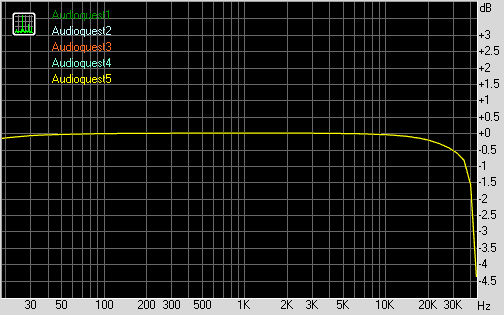
Looks good, wouldn´t you say? Oh, before I forget... please ignore that I used the commonly employed loopback method offered by RMAA, it´s just that I don´t have any hardware superior to the ASUS. Regarding the measurments I think that THD + Noise are a bit higher than I remember. But I may be wrong there. What I´m sure of is that I´ll repeat the measurments again (including jitter) when I have removed another soundcard I purchased recently, the Terratec Aureon 7.1 PCIe. I have not yet found a review for the Terratec - which means that I will review this interface myself. What? Why did I buy the Terratec? Well, I needed an optical input capable of receiving the samplerate of 88.200 Hz transmitted by the optical output of my Pioneer BDP-140. You´re probably guessing that I wished to copy my SACDs digitally... congratulations, your guess is correct! No, you don´t win anything, sorry. Anyway, I´ll write an article about copying SACDs without the Playstation 3 sometime in the near future, you will be able to read everything important then. I´ll also write an article reviewing the wonderful FiiO E07K 'Andes', I´ve owned it since January and have used it often. Other articles to be written will be about several vintage portable CD players, lossy codecs being able to process high definition audio material and... MD recorders. You´ve read correctly: I'm perfectly aware that I´ve stated back in November 2012 that I won´t write MD-related articles anymore because of technical obsolescence and friends bothering me with questions like "Who reads this crap?" Well, I do. I also happen to love MD, I can´t help it. I know it´s old-fashionend; I also have to confess I´m well aware that I´m no different from those vinyl crazy audiophile nincompoops believing in an ancient and essentially dead media format. But I don´t care; if you don´t want to read those articles just skip them.
But do you know what all of this means? Yeah Baby, I´m back!
Last update: 30.07.2013