Well, I won´t tell you about "secrets" - simply because there aren´t any. Up- or/and Oversampling are fairly standard in any CD player, soundcard, network player, mp3 player or similar stuff. They are not really necessary but they reduce unwanted digital artifacts... or so they teach us. I also won´t tell you in detail how oversampling or upsampling works because that´s far too technical and because I lack the knowledge of how it exactly mathematically (my boyfriend is a mathematician but he doesn´t care about this stuff).
What is oversampling? It´s a process of multiplying (for example 4fs oversampling means quadrupling the information) the data so engineers are able to use a simpler constructed (and cheaper) aliasing filter above the transition band. Aliasing artifacts are a inherited system anomaly when digital is converted back to the analogue domain (and vice versa but we´ll be looking at the playback chain only). These aliasing artifacts are nothing more then the signal from 20-22.050 Hz mirrored to higher frequencies (from 22.050 to 44.1000). Contrary to what anyone has told you or will tell you (including me) these are indeed artifacts, distortions or imaging products. They are false "signal ghosts" which in theory could become dangerous because of the possibility of creating intermodulation distortion on amplifiers which in turn destroy the loudspeakers - both are often stated mantras in engineering circles. These "artifacts from Hell" therefore have to be removed from the outputted signal. One must do this with a low pass filter, either digital or analogue - digital is more effective and less prone to introduce other unwanted distortions. On the first CD players without oversampling the analogue filters kicked in at 20.000 Hz (at the end of the passband) and because of these filters not being very good (because of a very small transition band from 20.000 to 22.050 Hz) and also because they were so very near to the audible frequency band they produced some other artifacts like phase distortions or were very hard to design.
So oversampling was devised as a simple & cheap method to move the place for the alias filter to kick in to a higher frequency so that it wouldn´t hurt the audible signal from 20-20.000 Hz. Let´s look at my exemplary quadrupling oversampling filter again: you´d end up with a samplerate of 176.400 Hz simply by multiplying the digital output (44.100 Hz) four times. When you stretch something with 4fs oversampling you create gaps and these gaps are filled with interpolated data. Result: only one out of four data points is a "real" point whereas the other three points have been guessed based on the available real data. But the effect of the transition band moved to 176.400 Hz is more advantageous then the disadvantages of the interpolation because now you just need one simple electronic part to remove unwanted aliasing effects - and you won´t even hurt the signal too much; the transition band can be much wider and less perfect. The aliasing filter doesn´t kick in at 22.050 but at 88.200. Other advantages of oversampling are higher resolution (more possible bit-depth) and less noise because quantization noise can be spreaded into a wider overall frequency band. That´s why oversampling is used today in almost any digital device - and it´s good that way. Well, there are still people (the guy from XXHighEnd for example) or companies around who prefer true multi-bit and non-oversampling D/A-converters (i.e. the classical approach) - they now look a bit ridiculous, don´t they?
Upsampling isn´t that much different because it too creates more data by increasing its amount, much the same as Oversampling (but at a later stage). Only the output is different. With oversampling the output has the same samplefrequency as the input, with upsampling (correct would be
resampling) you change the output itself. Depending on how often you resample you can create any frequency you want, from 88.200 to 192.000. That´s also the reason why an ancient
DAC-7 by Philips is able to output higher samplerates then the 44.1 kHz it was initially designed for when released in the early '90s (as proven by
Pro-Ject and their external DAC).
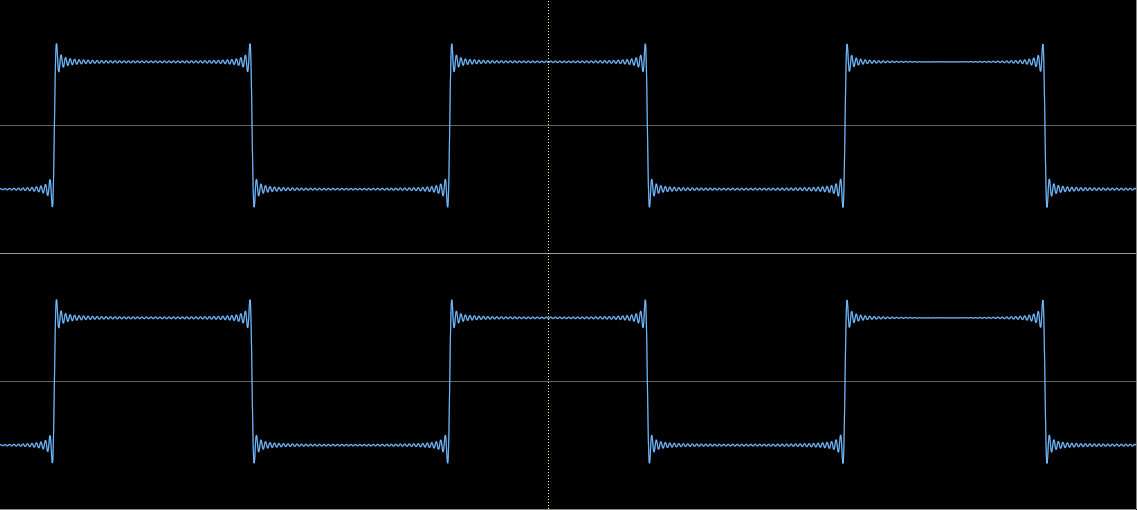
So, what do we have now? An aliasing artifact free output in both cases. BUT: other artifacts have been introduced because oversampling/upsampling still need digital filters to remove unwanted content above 22.050 Hz. These low pass filters work at precisely 22.050 Hz and depending on how wide or small (the slope) this low-pass filter is designed to work inside the transition band it will erase all frequencies up from 20.000 Hz (this was actually intended and that´s also the reason why you can often read about a frequency response of 20-20.000 Hz for CD; the 2.050 Hz are designed to be a "buffer" or a "spare".). Where was I? Ah yes, the slope. A steep slope used with the low-pass filtering stage for example creates an unwanted artifact called "ripple":
On this example using a 44.1 kHz created square wave (base frequency: 500 Hz) the signal begins to ripple
before the actual signal happens and continues to ripple after the signal stopped - this is called pre- and post echo.
This ripple effect is another inherent necessity because of the window function used to design the low-pass filter. You can either have this or a frequency deviation that is close to the transition band. With a perfect filter you wouldn´t have any frequency deviation or ripple - it´s sad that this perfect filter doesn´t exist. Mathematically it´s possible but the computational power needed for it would be way too demanding. And who would need to use it anyway? Because every engineer will tell you that this ripple only happens at the passband area at 22.050 Hz and doesn´t bleed into lower frequencies. Well, this actually isn´t true, I´ve tested it myself. The ripple effect will be weaker the lower you go on your frequency band - but on frequencies around 2.000 Hz it´ll be still apperent. Some companies did not like this behaviour and so they started to use a different filter design. The most prominent example would be the
spline algorithm by
Wadia. Starting in the late '80s they began to use a design with a much less steep filtering slope, called Spline Algorithm. But these were expensive high end players so a company from Japan,
Pioneer, created their own system, called
"Legato Link" which did the same as the filter from Wadia. The major difference between Wadia's spline algorithm and Pioneer's Legato Link was that Pioneer intended it for high end players as well as for components aimed at regular customers. They also backed it with a huge advertising campaign and some funny looking charts:
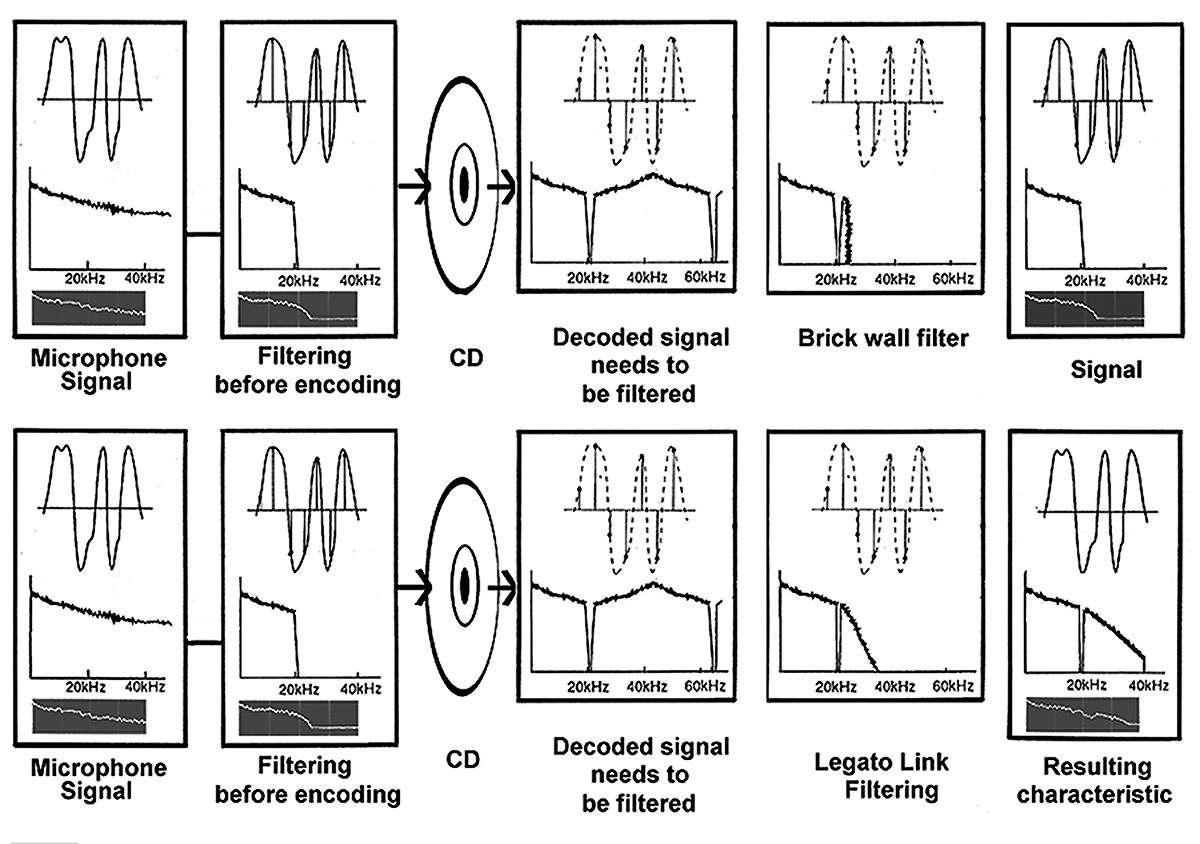
Copyright by Pioneer.
In effect they lied a bit by shifting the attention from impulses to frequency response. They claimed that their Legato Link system recreated lost frequencies by adding new ones. These "added" frequencies were of course nothing more then aliasing artifacts (correct would be the term "imaging") that were let through in a controlled way by means of a less steep low-pass filter, very similar to the one used by Wadia before. Over the years Pioneer used it in CD players, CD recorders, DAT recorders, MD recorders and DVD players. To my knowledge they even use it today but I don´t know if it still works the way as I´ve described here. However, the measurment loving community hated it because low-pass filters with gentle slopes may get rid of pre- and post ringing artifacts but they nevertheless create frequency deviations. They were skeptical for another reason too: the Pioneer design didn´t follow the age-old mantra of forbidding any aliasing, they even ignored that no amplifier or loudspeaker connected to a digital device with Legato Link filtering exploded (as they must have been expecting) while amplifiying those components. Anyway, with their Wadia-like filter design Pioneer decreased frequencies from the analogue output as much as -3 dB at 20.000 Hz. Of course, Wadia had the same problem but where Pioneer accepted a non-standard frequency response Wadia instead tried to counter these diminished high frequency power by adding harmonious distortions created by their analogue output stage (isn´t that funny: you want to get rid of distortions by adding new ones!). Anyway, both companies were successful in their endevour of perfecting the impulses:

The same signal as above but upsampled to 96 kHz with a gentle, Wadia/Pioneer like
filter (done with iZotope RX): look how much the ripple has been diminished.
Just for comparison: the same signal - only upsampled to 96 kHz with the usually used steep filtering.
Horrible, isn´t it? Ripple has been increased which is what you get with normal upsampling.
The ripple-free example looks good, doesn´t it? The pre- and post echos have been reduced and the signal is almost free of ripple or ringing artifacts. I´d love to tell you that the Pioneer players were the best in existence but sadly I cannot: I once owned a
Pioneer PD-S 802 myself - complete with Legato Link and their famous
Stable Platter drive (an unreliable thing) and I can assure you that it sounded like crap. I bought it because in every test I´ve read it was supposed to sound much better then my older
Technics SL-XP 300 (which wasn´t equipped with all those nifty techniques). But it did not and I was very disappointed. I have to admit, it probably sounded that bad because the effect of nice impulses was much smaller then the effects of the electronic parts surrounding the D/A-converters or the parts responsible for amplifying the RCA outputs. However, my next CD player was a
Sony CDP-XB 920 which had a switchable filter design (you were able to switch between standard, spline and analogue filter designs). Yet, the Sony sounded best with the standard filter. Maybe it sounded that well because it didn´t upsample at all, the Sony "only" oversampled, or because of the parts used at the output stage, whatever the reasons were, I don´t know.
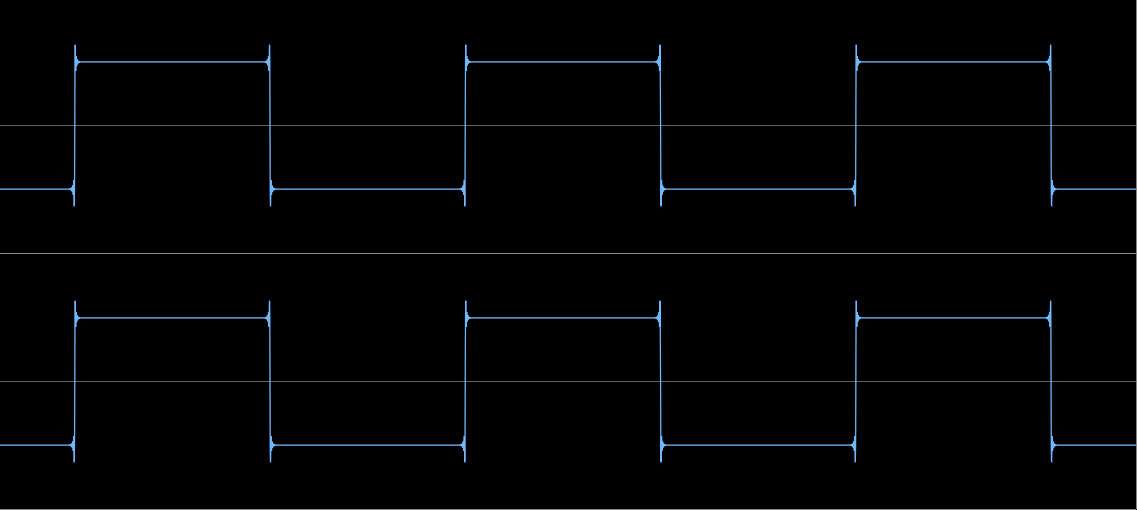
BTW: this is a native 96 kHz created square wave that hasn´t been upsampled: Almost pristine impulses.
So the Sony sounded slightly better with the
ripple-as-hell filter design. The example of my Sony shows two things:
1. Impulses are not that important
2. the circuit design is much more important for sound. To change the design of the low pass filter is only really necessary if you strive to finetune the output of a digital component, it certainly hasn´t the world saving effect Wadia or Pioneer have been claiming over the years. If you´re curious and want to review the effects of impulses for yourself you can do so: you´ll have to buy a neat and wonderful program,
iZotope RX Advanced. This program has a resampler that can be configured to your needs, you can for example use the standard filter for upsampling or a more gentle approach.
Before I forget:
you should never ever use the gentle approach when downsampling signals! If you´d do a serious error like that you would mirror aliased signals
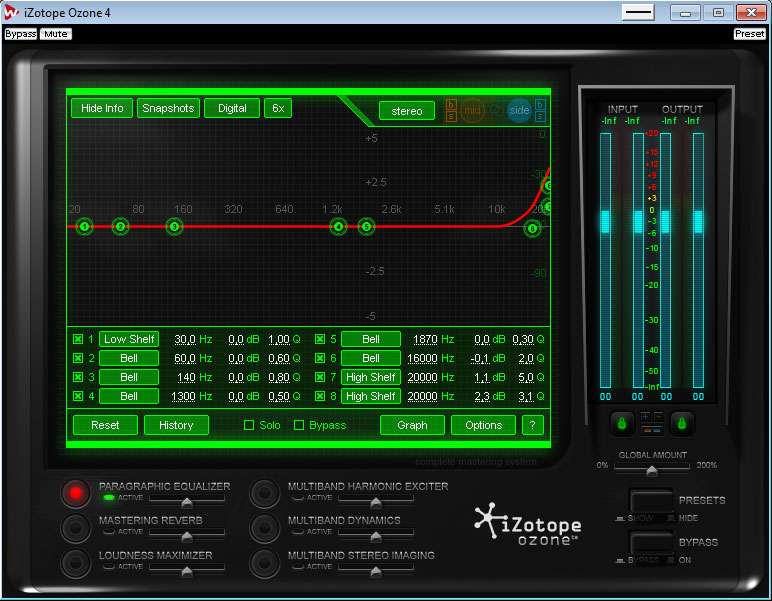
back into the signal - and that would be like inviting evil into your digital house because these aliasing distortions are permanent, cannot be removed once they are there and they tend to be quite audible. I say that because iZotope RX Advanced allows you to do just that, you have to be careful how to use it and you have to know what you´re doing. This isn´t for Noobs! Following that warning now a little advertising: besides having one of the best resamplers out there this program offers a ton of high quality DSPs for repairing destroyed audio material, in short it´s worth all its money. Oh, I forgot to mention: my approximation for the gentle low-pass spline filtering looks like this:

My standard setting for upsampling 44.1 or 48 kHz material.
I used a different preset for quite some time that was supposed to sound close to original 24/96 stuff and was modeled after a High End player from Marantz, for completists I will post it here too but please be aware that I discarded it some time ago. For one, I correct frequency errors introduced by my gentle filter with an EQ and secondly because of better hardware I now own. My "Marantz Preset" was created using a combination of double blind and sighted listening tests with my old Sounblaster Live! 24 Bit External; with that hardware it sounded close to original 24/96 material but when I got my revealing ASUS Xonar Essence ST three years ago I realized that it actually sounded a bit wrong and not at all close to original 24/96 material, probably because of the Cutoff shift moved to 1.18. Additionally, by moving the pre-ringing I also created slight phase distortions - I was aware of this back then but I accepted them as inevitable for my goal to reach sonic perfection. So here it is but be advised that you´ll introduce other types of flaws or distortions into your material permanently:
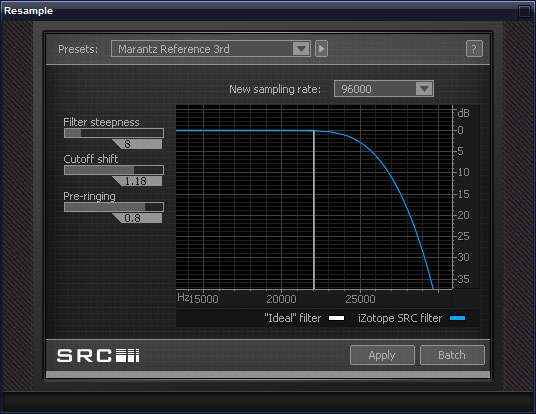
My old configuration. Don´t use it.
Attention, fellow readers: both configurations I´ve shown to you destroy the material integrity you´re working with! Just remember that it´ll run through a low-pass filter for a second time the moment you convert it back to analogue at playback. The effects won´t be that severe because the passband will be far away from audible frequency bands and because modern, 96 kHz capable D/A converters are using a gentle slope at high sampling frequencies - but still: every processing step you do will further diminish the quality of your material. You can circumvent some ill effect by using the highest bit-depth within iZotope RX Advanced of 32 Bit floating point and by saving your work with this bit-depth (or at least dither when you decrease bit depth to 24 Bit). Furthermore, be advised that you´ll create a frequency error with in the end much more worse effects compared to the ripple effects you rather wanted to erase:
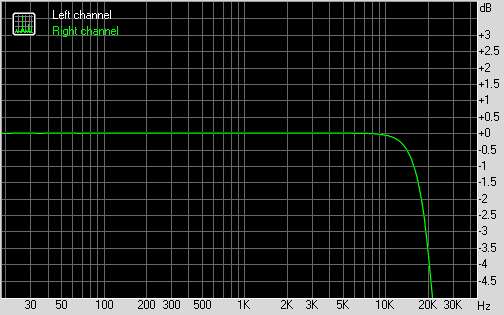
With the gentle spline filter you´ll get this frequency response.
No pre- and post echoes but a frequency error.
The frequency error can be countered to a certain extent with an EQ.
Of course, by using a digital EQ you´ll introduce another DSP into your processing chain, in effect diminishing the signal quality further. If you use 32 Bit floating point dithering before decreasing to 24 Bit you can avoid some ill effects - even if it´s still an additional DSP. I myself use this method on every music I listen to but I´m fully aware that I´m destroying the signal integrity. Why am I doing this? Because the music I listen to probably was processed with a multitude of effect signal processors with not much naturalness left anyway (except some very good, natural recordings that I don´t upsample at all). Anyway, there´s still one thing you don´t have to pay attention to: you´re not going to destroy your loudspeakers, it just won´t happen - and you could have this impression by reading some comments about this on hydrogenaudio. My general warning however remains and is still valid: I´m replacing one ill effect with another. You´ll also have to be aware that you won´t (and never will be) creating true 24/96 material! What once was lost cannot be recovered or re-engineered. The material I´m listening to most of the time is nothing more then a pleasant sounding fake that pleases my ears but that shouldn´t be looked at from a data integrity or measurment standpoint. In the end you´ll have to decide what you´ll be doing for yourself, I wish you much fun and luck!